AI-Flow
Open-source visual builder for creating chains of different AI models without programming.

Ranked in
Overview
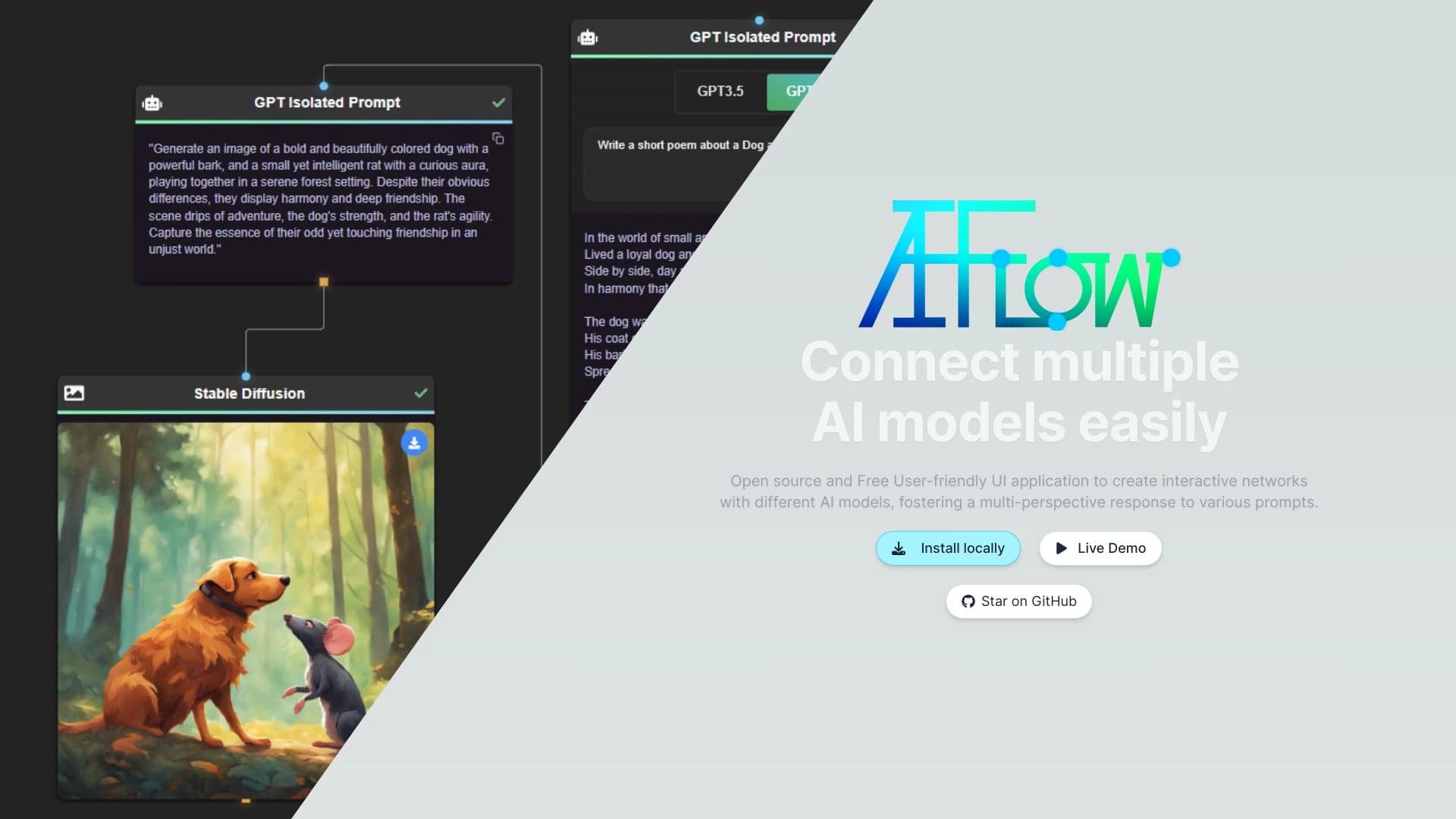
AI-Flow is an open-source platform that turns working with artificial intelligence into a visual, block-based builder. Instead of writing code, users connect blocks from different neural networks on an interactive canvas, creating complex automated chains. The platform acts as a kind of "glue" between providers such as OpenAI, StabilityAI, Anthropic, and Replicate, allowing you to combine their capabilities in a single workflow.
A key feature of AI-Flow is local storage of all data and settings. This means your projects and configurations never leave your computer, ensuring privacy. Thanks to its open-source code, the platform can be modified for specific individual tasks by adding custom modules or changing the logic of existing ones. Created workflows can be run both directly within the application and integrated into third-party projects via API.
AI-Flow Features
| Feature | Value |
|---|---|
| Type | Open source program |
| Category | Tool for combining AI models and creating interactive networks |
| Developer | AI-Flow |
| Interface | Visual drag-and-drop |
| Supported models | OpenAI, StabilityAI, Anthropic, Replicate, and others |
| Free tier | Available (basic features without restrictions) |
| Monthly visits | 55.8K |
| Availability | Desktop application (downloaded to your computer) |
Who is AI-Flow for?
AI-Flow is designed for a wide audience — from beginners to professionals who need a builder for AI processes without writing code.
Beginners and enthusiasts
For those just starting out with neural networks, the platform offers an intuitive visual interface. Instead of studying documentation and setting up an environment, you can simply drag and drop blocks with your mouse, experimenting with combinations of different models.
Developers and product managers
For professionals, AI-Flow is useful for rapid prototyping. Instead of writing code from scratch to test a hypothesis, you can assemble a working process from ready-made blocks in minutes and test your idea. For product managers, it's a way to visually demonstrate the capabilities of AI solutions without involving a development team.
Marketers and analysts
For content specialists, the platform allows automating routine tasks: text generation, fact-checking, and review analysis. Analysts can build chains of models to process and systematize large volumes of information.
How to use AI-Flow?
Installation and launch
The first step is to download the AI-Flow desktop application to your computer. After installation, a workspace with a visual builder opens.
Building a workflow
In the interface, users see a palette of available models and blocks. The core idea is dragging these elements with the mouse onto the workspace. Blocks are then connected with lines, defining the sequence and logic of data processing. You can connect your own data sources and build interactive schemes for automatic content generation.
Configuration and launch
Each block requires configuration. For example, to use GPT models, you need to enter your own OpenAI API key. After configuring all elements, the workflow runs directly in the application, and results can be exported or passed further along the chain.
Key features of AI-Flow
Visual no-code builder
The platform's main feature is creating AI workflows through a clear drag-and-drop interface. No programming skills are required to connect multiple neural networks into a single data processing pipeline.
Integration of multiple AI providers
AI-Flow supports connecting models from OpenAI, StabilityAI, Anthropic, Replicate, and others. This means you can combine, for example, GPT-4 for text generation and Stable Diffusion for image creation in one workflow, achieving complex results.
Ability to run workflows in-platform or in your own projects
Created chains can not only be run locally in the application but also integrated into your own software products. This turns AI-Flow from a simple builder into a full-fledged development tool.
Local data storage
All projects, settings, and intermediate results are stored on the user's computer. This ensures privacy and control over data, unlike cloud services.
Advantages of AI-Flow
Flexibility and versatility
The ability to combine models for working with text and images in a single scheme opens up possibilities for non-standard tasks. The user is not limited to one provider and can choose the best tool for each specific operation.
Low entry barrier
The simple visual interface makes the platform accessible to beginners without a technical background. At the same time, the functionality is sufficient for experienced users to build complex multi-stage pipelines.
Open source and free model
Open code and a free basic tier are significant advantages. An active developer community ensures frequent updates, and anyone can refine the platform to suit their own needs.
Disadvantages of AI-Flow
Complexity of configuring third-party models
Although the builder doesn't require programming, integrating external models requires attention. Each provider has its own parameters and configuration specifics, which can take considerable time when working with a large number of blocks.
Limits on data processing volume
The platform has limits on the size of processed data. Large data arrays cannot be processed, which imposes restrictions on use in tasks involving large datasets.
Security responsibility lies with the user
When connecting external AI services over the network, you must independently configure protection against data leaks. The platform does not provide built-in security mechanisms for network interaction, requiring additional action from the user.
What tasks does AI-Flow solve?
Automating content generation and verification
Using chains of models, you can automate the creation of texts, images, and subsequent verification of results. For example, one model generates a draft, while another checks it against specified criteria.
Fast text analysis and idea generation
AI-Flow is suitable for creating pipelines for analyzing textual information and generating ideas. Models can work sequentially: one identifies key themes, another suggests ways to develop those themes.
Prototyping and testing AI compositions
The platform is convenient for quickly testing hypotheses about how different models interact. Instead of a long development cycle, you can assemble and test several combinations of neural networks.
AI-Flow Pricing
Free tier
The basic set of features is available for free and without restrictions. This allows anyone to try the platform and its main usage scenarios.
Professional tier
Paid subscription with expanded capabilities and priority user support.
Business tier
Provides all platform features, team collaboration capabilities, and additional integrations.
Terms of use for AI-Flow
To get started, you need to download the application to your computer. The platform has no web version — everything works locally.
An important condition is that to use some models, such as GPT, you will need your own OpenAI API key. For beginners, OpenAI provides free credits, allowing you to start without initial investment. Similar requirements may apply to other providers, such as StabilityAI for image generation.
Availability of AI-Flow
AI-Flow is distributed as a desktop application that is downloaded to your computer. Information about supported operating systems and localization is not specified in the source pages. There is also no data on the platform's availability in various regions of the world.
How AI-Flow differs from alternatives
Visual builder instead of code
Unlike developer-oriented tools such as GitHub Copilot or Tabnine, AI-Flow does not require writing program code. The workflow building process is fully visualized through block dragging.
Aggregation of different providers
Unlike platforms that work with a single ecosystem, AI-Flow combines models from many providers — OpenAI, StabilityAI, Anthropic, Replicate. This allows creating combined chains, such as "text → image → analysis," within a single interface.
Local storage and open source
The key difference is that all data is stored locally on the user's computer, and the source code is open. For comparison, services like Microsoft Copilot Studio operate in the cloud and do not offer modification capabilities. AI-Flow combines the privacy of a desktop application with the flexibility of code modification.
Broader application than aggregator alternatives
Unlike simple neural network aggregators, AI-Flow allows building not just requests to different models, but full-fledged multi-stage pipelines with custom logic, making it closer to low-code platforms for business process automation.
Conclusion
AI-Flow is an open-source desktop program that provides a visual builder for combining various AI models into automated chains. The platform suits both beginners and experienced users for content automation and experiments with neural networks. Thanks to its free basic version and open code, it is accessible for a wide range of tasks, but requires attention when configuring third-party models and organizing data protection independently during network interaction.
Frequently asked questions
See also

AI toolkit for video generation and editing, including avatars, lip-sync, and voice cloning.

An open platform for generating images and other visual content from text descriptions using AI.

Online AI-powered service for quickly creating presentations based on a given topic or an uploaded document.
A platform for content creators that combines link management, email marketing, an online store, and analytics in a single visual editor without coding.

AI platform for automatic workday planning, task management, and prioritization.

Unified API access to more than 500 AI models, including GPT-5 and Claude 4.5, with the ability to save on costs.

AI platform for user support in applications, including a chatbot and ticketing system.

Online AI speech synthesis platform that allows generating audio with voices of famous characters and celebrities.