AI Face Swap Video
Online service for replacing faces in videos using AI.

Overview
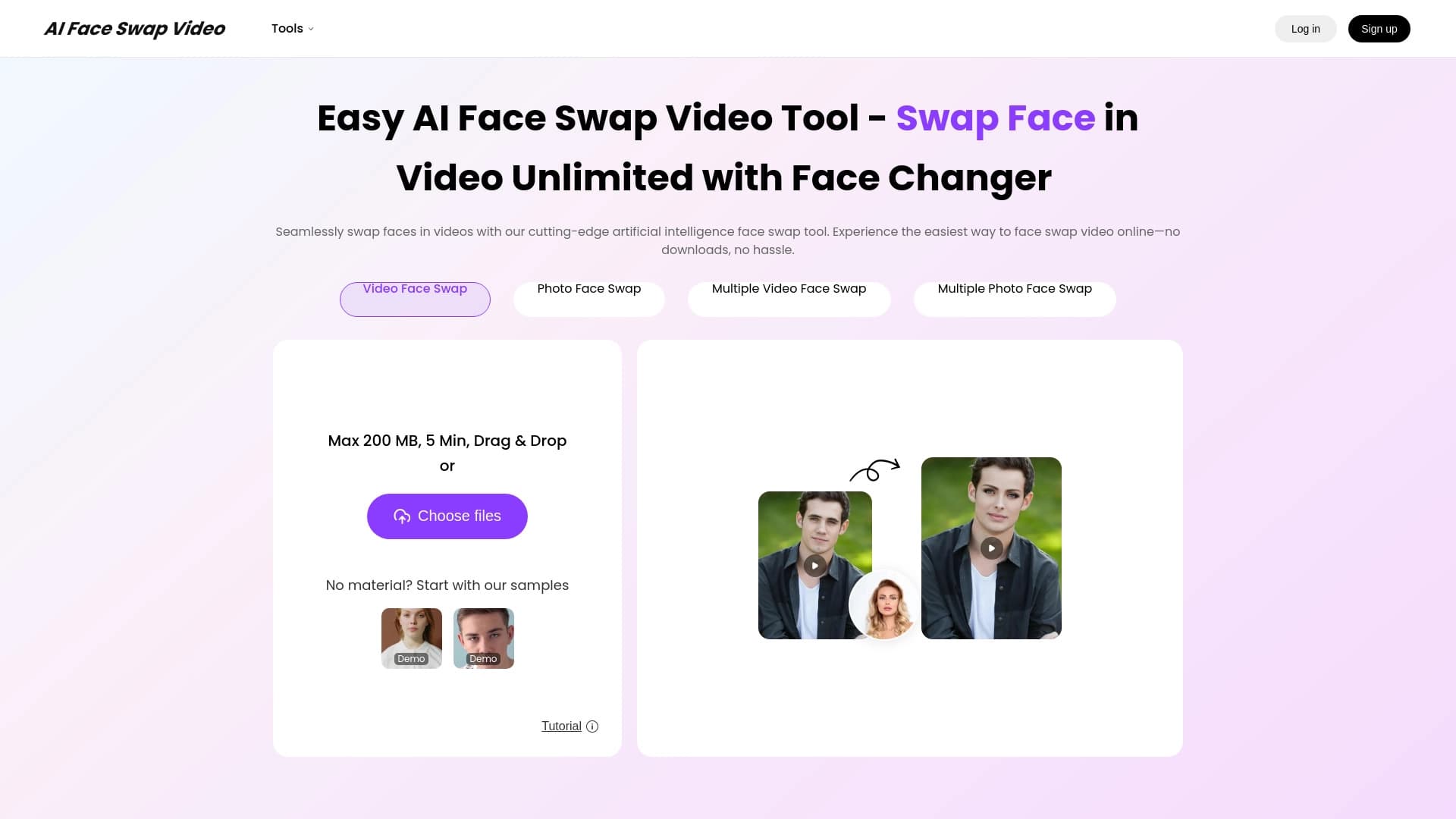
AI Face Swap Video is a specialized online service designed for swapping faces in videos and photos. The tool's main feature is that it works entirely in the browser: users don't need to download or install heavy programs or applications. All data processing happens on the service's side using artificial intelligence technologies that automatically detect, track, and replace faces in the frame.
The service is positioned as a solution for quickly creating entertainment content and experimenting with video. Thanks to automated algorithms, users don't need video editing or deep learning skills — just upload a file, choose a face, and start processing. The service focuses on realistic results and ease of use, making it accessible to a wide audience.
AI Face Swap Video Features
| Feature | Value |
|---|---|
| Type | Online tool for face swapping in videos |
| Platform | Browser (no installation required) |
| Multiple face support | Yes |
| Maximum upload size | 500 MB |
| Maximum video length | 10 minutes |
| Supported scenarios | Face swap in video, face swap in photos, multiple face swap in video/photo, celebrity face swap, gender swap, meme creation |
| Free plan available | Yes (no credit card required) |
| Multilingual interface | Supports dozens of languages |
Who is AI Face Swap Video for?
Content creators and bloggers
The tool will be useful for video bloggers and authors who need to quickly process a clip for social media without getting distracted by complex software. The ability to swap faces in videos up to 10 minutes long allows creating parodies, clips, or interactive formats without lengthy rendering on a local computer.
Users who value simplicity and speed
The service is designed for those who don't want to figure out professional video editors. The interface is maximally simplified, and the process comes down to a few clicks. It's an ideal option for quickly testing the technology or completing a one-off task when installing an app isn't practical.
Entertainment content enthusiasts
For those who like experimenting with memes, putting celebrities' faces into funny scenes, or trying gender swap in videos, AI Face Swap Video offers all the necessary tools. The lack of entry barriers like registration and credit card requirements makes the service attractive for both one-time and regular entertainment.
How to use AI Face Swap Video?
Uploading and selecting a file
To get started, drag and drop a video or photo file into the dedicated window on the website. The service has clear requirements for source material: file size no more than 500 MB, and video duration no longer than 10 minutes. If you don't have a suitable file, you can use the built-in sample library to test the functionality.
Setting up and starting processing
After uploading the file, the system will ask you to select the source face to be used for the swap. Then just press the start button, and the neural network will automatically perform the swap, tracking movements and facial expressions. Once processing is complete, the user can review the final result and save it.
Project management
The service provides a project history feature that lets you return to previous works for review or editing. This is convenient when creating a series of similar videos that require the same source files or settings.
Key features of AI Face Swap Video
Face swapping in videos and photos
The service's core capability is realistic face swapping in motion. The neural network tracks facial features and blends them with the new image, achieving a natural result without obvious editing artifacts.
Working with multiple faces
Unlike many similar services, AI Face Swap Video supports swapping multiple faces in a single project. This applies to both video files and photos, opening up broad possibilities for creating group scenes or complex compositions.
Browser-based operation
The entire processing cycle happens online. No need to download apps or install plugins makes the service cross-platform and accessible from any device with an internet connection.
Additional scenarios
Beyond standard face swapping, the tool allows experimenting with a character's gender, creating memes, and swapping in celebrity faces. Users can upload their own materials or use ready-made examples for inspiration.
Advantages of AI Face Swap Video
Low entry barrier
The main advantage is a full-featured free plan that doesn't require entering bank card details to activate. This lets any user start working immediately without financial risk.
No installation required
Browser-based operation saves disk space and installation time. Users can visit the site from any device — desktop PC, laptop, or tablet — and start processing videos.
Multiple swap support
The ability to swap several faces simultaneously in one file is a significant advantage over tools that process only one face at a time. This expands creative possibilities and reduces post-processing time.
Disadvantages of AI Face Swap Video
Upload content limits
The service sets clear limits: file size must not exceed 500 MB, and video duration — 10 minutes. For longer videos or high-resolution footage, this could be a significant obstacle.
Opaque pricing structure
Although the free plan is available to everyone, details about advanced features (VIP model) are not publicly disclosed. Users can't tell which features become unavailable on the free tier or what the actual cost of paid access is.
What problems does AI Face Swap Video solve?
Creating entertainment content
The service excels at generating memes, celebrity parodies, and humorous videos. Quick face swapping in photos and videos allows creating viral content in minutes.
Rapid idea prototyping
Thanks to ease of use and free access, the tool is suitable for quickly testing hypotheses. For example, content creators can quickly assess how a particular idea would look with a different face in the frame before launching full-scale production.
Appearance experiments
The gender swap and face substitution features let users experiment with their look, try on the appearance of movie characters, or simply have fun with friends creating unusual photos and videos.
AI Face Swap Video Pricing
The service offers a basic free plan that doesn't require entering credit card details. It allows uploading files within the set limits (500 MB, 10 minutes) and using the core face swapping features.
For users who need more capabilities, a paid VIP model is available. However, pricing details — cost, specific feature set, and differences from the free plan — are not publicly disclosed. To clarify the terms, users will need to contact the developers or register with the service.
Terms of use for AI Face Swap Video
To start using the service, no bank card details are required — this is a key condition for getting started. A free tier designed for basic use is available.
There's no explicit mention of mandatory registration on the page, but to maintain project history and save results, creating an account will likely be necessary. This is standard practice for online services, allowing user data to be tied to a specific account.
AI Face Swap Video Availability
The service is fully accessible through the browser, ensuring it works on most devices with an internet connection. The interface is translated into dozens of languages, making it comfortable for an international audience.
The service page contains no information about regional restrictions or the need to use a VPN. This suggests the tool is likely available in virtually all countries worldwide without special access conditions.
How AI Face Swap Video differs from alternatives
Focus on browser version
The key difference from services like Reface App is the focus on browser-based operation rather than a mobile app. This allows using the tool from any device, including desktops, without being tied to a specific operating system.
Clear technical limits
Unlike mobile apps where limitations are often hidden, AI Face Swap Video provides transparent, clearly defined limits: 500 MB and 10 minutes. This lets users immediately understand whether their file is suitable for processing.
Comparison with Reface App
AI Face Swap Video is positioned as a dedicated tool for face swapping in videos, while Reface App is a broader mobile product with AI avatars and related apps (Revive, Restyle, Ink AI). If a user needs realistic face swapping with support for multiple objects in the frame and free entry without a card, AI Face Swap Video may be a better choice.
Conclusion
AI Face Swap Video is a practical online tool for those who need simple and fast face swapping in videos and photos without installing apps. The service is attractive for its free access without a credit card, support for swapping multiple faces in a single project, and clear technical limits. The main limitations are the file size (500 MB) and duration (10 minutes) caps, as well as the lack of public information about paid plans. Overall, the tool will be a reliable assistant for entertainment content creators and anyone who wants to experiment with video right in the browser.
Frequently asked questions
See also
A platform for content creators that combines link management, email marketing, an online store, and analytics in a single visual editor without coding.

AI-powered online platform for quickly creating text content, including blogs, articles, and social media posts.

AI tool for automatically creating comics and manga from text scripts and stories.

Online AI speech synthesis platform that allows generating audio with voices of famous characters and celebrities.

Browser extension and web service with AI assistant features: answering queries, summarizing videos and documents, and translating text.
AI agent for automating routine browser actions, such as filling out forms and collecting data.

AI-powered platform for generating and editing images and videos.

Generate advertising UGC videos with virtual actors without real filming.