
AI Face Blur
Automatically blurs faces in photos and videos using AI.
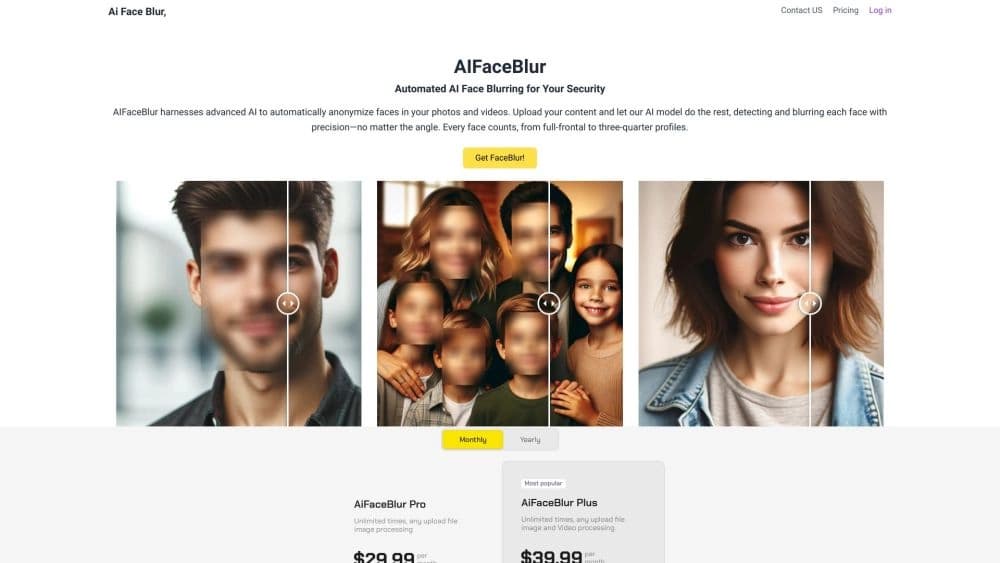
Overview
AI Face Blur Neural Network Description
AI Face Blur is an online service that automatically detects faces in photos and videos and blurs them. It is built on computer vision technology: users don't need to manually select areas or adjust masking parameters. Simply upload a media file, and the algorithm will identify where faces are located and apply the blur effect.
Processing happens in the cloud, meaning no additional software installation is required. The service is positioned as a tool for protecting personal data — both in everyday scenarios (e.g., publishing photos of children on social media) and in professional contexts (preparing reports, interviews, or documents). It's worth noting: the developer does not disclose details of the technical implementation, so accuracy can only be assessed based on the described use cases.
AI Face Blur Features
| Feature | Value |
|---|---|
| Type | Web service |
| Category | Miscellaneous |
| Developer | AI Face Blur Technologies |
| Monthly visits | 388.9K |
| Free plan | Available (basic features) |
| Distribution model | Not specified |
Who is AI Face Blur suitable for?
Regular users publishing content publicly
For people who run blogs or share family photos or videos on social media, the tool helps hide the faces of random passersby or relatives. This is relevant when strangers who haven't given consent to publication appear in the frame.
Professionals working with sensitive materials
Journalists, camera operators, media editors, and compliance department staff often need to anonymize content before release. AI Face Blur is suitable for preparing materials where confidentiality matters: reports from mass events, interview recordings, surveillance camera footage. For this audience, speed is valuable — there's no need to manually process every frame in a video editor.
How to use AI Face Blur?
Uploading a file and starting processing
The process is fully automated and consists of three steps:
- Open the service website.
- Upload a photo or video — various formats are supported, without being tied to specific extensions.
- Wait for processing to complete: the neural network finds all faces and applies blurring on its own.
No manual settings, sensitivity adjustments, or zone selection are required. This is the main difference from classic editors, where you need to manually track every frame.
Usage limitations
Since processing is done online, the quality of the result directly depends on the source material. In poor lighting, with many people in the frame, or against an unusual background, the algorithm may make mistakes — for example, missing a face or, conversely, blurring unnecessary objects.
Key features of AI Face Blur
Automatic face detection at unusual angles
The AI is trained to find faces even when a person is turned sideways, partially covered by hands, or in the background. This expands use cases — for example, it allows safely publishing footage from busy streets or concerts.
Blurring on photos and videos
One upload — and the algorithm processes both static images and video clips. Users don't need to convert files or run two different tools.
Fully online mode
All you need is a browser. The service doesn't require installation on your computer, which is convenient when using different devices or when you need to quickly process a file on the go.
Advantages of AI Face Blur
- Accuracy at complex angles: recognition works even with unusual head positions, profile views, or partially covered faces.
- Full automation: no manual processing — this saves time when working with large volumes of media files.
- Reliable data protection: the service handles anonymization, which is critical when preparing materials for public access.
The key advantage is the balance of speed and quality for typical scenarios: upload, wait, download the result.
Disadvantages of AI Face Blur
- Errors in poor lighting: in dark frames or with harsh backlighting, the algorithm may incorrectly determine face boundaries.
- Problems with complex scenes: with large crowds or strange backgrounds (tree branches, geometric patterns), false positives are possible.
- Risk of blurring important details: if a face isn't the only meaningful element of the frame, the algorithm may affect neighboring objects that don't need to be hidden.
- Dependence on source quality: low resolution, heavy compression, or blur in the original reduces recognition accuracy.
In other words, the service is ideal for "clean" sources but requires checking results on complex material.
What tasks does AI Face Blur solve?
Hiding faces for anonymity
The basic task is to remove a person's recognizability in photos and videos. This may be required when publishing materials involving minors, victims, witnesses, or simply people who don't want to appear in the frame.
Anonymizing content before publication
The second scenario is preparing media files for release to public sources: media outlets, reports, presentations, social networks. AI Face Blur helps comply with privacy requirements without manually blurring every frame.
AI Face Blur Pricing
The service uses a hybrid model: there's a free plan with basic features for getting started, as well as two paid tiers for more intensive use:
| Plan | Price | What's included |
|---|---|---|
| Free | Free | Basic features, limited processing volume |
| Standard | Paid monthly | Extended capabilities, higher speed |
| Premium | Paid monthly | Unlimited uploads, priority support |
Exact limits of the free plan (number of files, maximum resolution, etc.) cannot be specified based on available data — they are not disclosed.
AI Face Blur Terms of Use
Official information about terms of use — legal aspects, storage policy for uploaded files, data processing timelines — has not been published in open sources. It is known that the service works through a web interface, and processing is performed server-side. Potential users should review the privacy policy on the service website before uploading sensitive materials or contact support to clarify details about storing original and processed files.
AI Face Blur Availability
The service is fully online — all you need is a browser and internet access. Support for specific interface languages and regional availability are not specified in the source data. Given that the monthly audience exceeds 388 thousand visits, it can be assumed that the project works in at least several languages, but the exact list of localizations cannot be confirmed based on available facts.
How AI Face Blur differs from alternatives
The main difference between AI Face Blur and competitors (Blureasy, BLUUBRIDGE, Blumo AI, and others) is the emphasis on full automation without any manual settings. Many services offer "brush" modes for manual selection or blur intensity adjustment. Here, the process is as simplified as possible: upload — process — result.
The second difference is the focus on both content types: photos and videos. Some specialized services work only with images, while video solutions often require software installation or API usage. AI Face Blur is positioned as a universal web-based tool.
An important nuance: the service has no public information about batch processing support or API integrations. For professionals who need to integrate blurring into their own media processing pipeline (e.g., via API), this could be a decisive difference from more technically equipped competitors.
Conclusion
AI Face Blur is a practical and simple tool for automatically blurring faces in photos and videos. Its main strengths are full-cycle automation (nothing needs to be configured manually), online operation, and an attractive free plan for basic tasks. The service suits both individual users concerned about privacy on social media and professionals preparing media materials for publication. However, when working with complex sources (poor lighting, crowded scenes, low recording quality), it's worth double-checking the result, and before uploading sensitive files — clarifying their storage conditions. With a thoughtful approach, AI Face Blur covers the core need for fast anonymization without extra effort.
Frequently asked questions
See also

Web platform for AI-powered image and cinematic video generation, featuring studio-grade editing tools.


A neural network for generating short videos from text descriptions or images.


Free web tool from Google that uses machine learning to turn rough sketches into neat icons and illustrations.


Generative platform for creating realistic images and short videos from text or images with control over style and camera movement.


AI-powered platform for automated video clip creation, editing, and translation.


Online image editor with AI-powered features for photo processing, design, and content generation.

Service for creating personalized avatars and photo shoots using AI based on uploaded selfies.


Neural network for fast video generation and editing from text descriptions, images, and references.