
AI Color Art
Serviço online para colorização automática de fotos em preto e branco usando redes neurais.
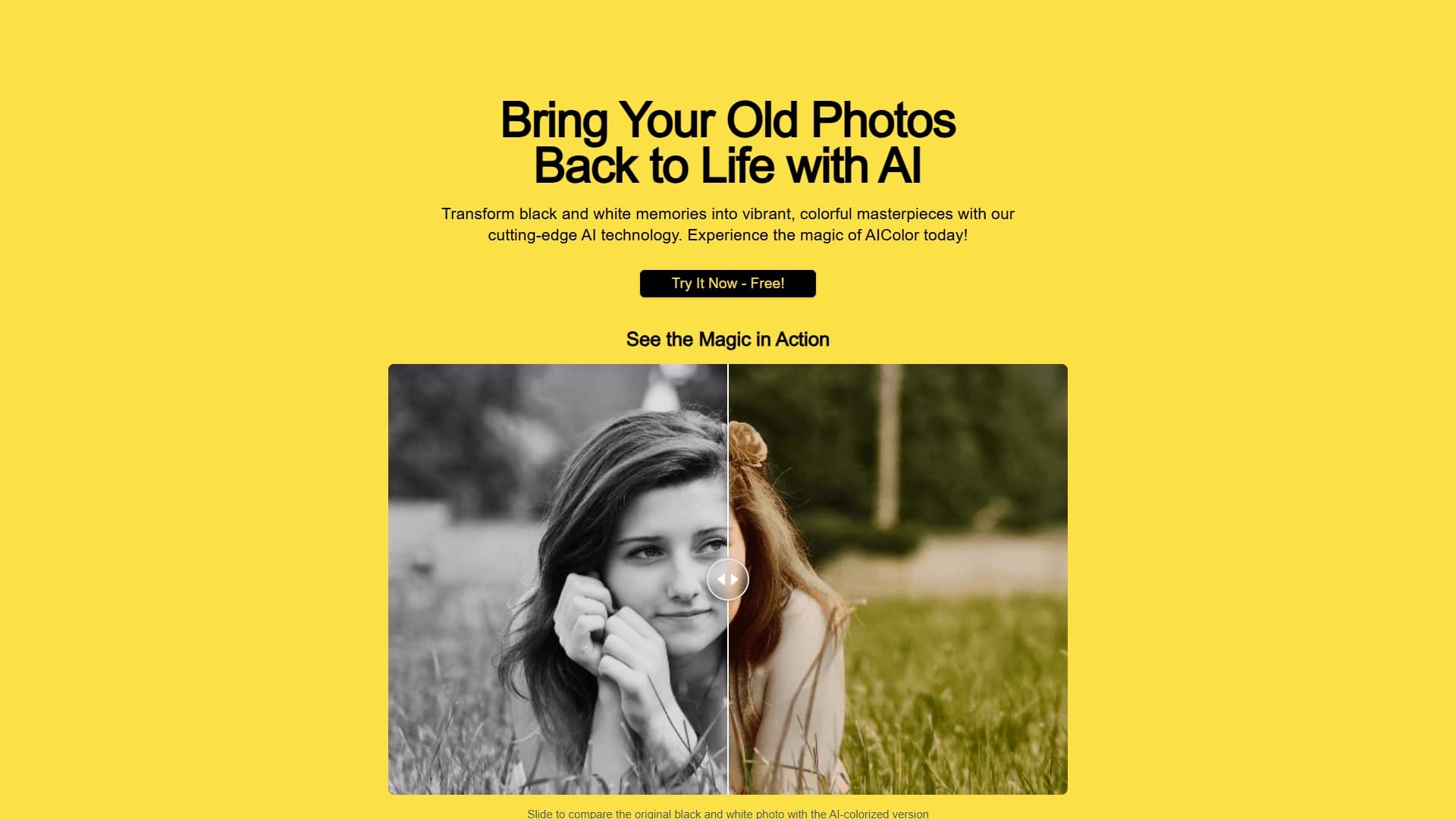
Visão geral
AI Color Art é um serviço web que coloriza automaticamente fotografias em preto e branco, utilizando algoritmos de aprendizado profundo. A rede neural foi treinada em um grande conjunto de imagens e é capaz de selecionar tons realistas para pele, roupas, fundo e outros elementos da foto. Isso permite "dar vida" a fotos antigas em poucos cliques, conferindo-lhes cor natural.
O serviço funciona diretamente no navegador — o usuário não precisa instalar programas ou entender de configurações complexas. Basta carregar o arquivo e o sistema realiza o processamento automaticamente. O resultado final pode ser baixado em alta qualidade ou compartilhado imediatamente nas redes sociais.
Características do AI Color Art
| Característica | Valor |
|---|---|
| Tipo | Serviço online baseado em IA |
| Categoria | Restauração de fotos, Edição de fotos |
| Formatos de foto suportados | PNG, JPG, JPEG |
| Tamanho máximo do arquivo | 5 MB |
| Site | www.aicolor.art |
| Data de publicação | 31 de dezembro de 2025 |
Para quem o AI Color Art é indicado?
Para proprietários de arquivos familiares
O serviço será útil para quem deseja digitalizar e restaurar fotografias antigas da família. Colorir as imagens ajuda a ver a história da família sob uma nova perspectiva e a preservar memórias em um formato mais vivo.
Para criadores de materiais históricos
O AI Color Art é adequado para preparar ilustrações para projetos históricos, blogs ou materiais educativos. Com ele, é possível tornar imagens de arquivo mais claras e atraentes para o público moderno.
Para usuários sem formação especializada
A ferramenta foi desenvolvida para pessoas que não têm experiência com editores de foto e não conhecem os princípios de correção de cores. Todo o processo é automatizado: o usuário só precisa carregar o arquivo e obter o resultado.
Como usar o AI Color Art?
Carregamento do arquivo original
Para começar, é necessário preparar uma foto em um dos formatos suportados: PNG, JPG ou JPEG. O tamanho do arquivo não deve exceder 5 MB. Em seguida, a imagem é carregada no serviço pela interface web.
Processamento automático
A rede neural analisa a foto de forma independente e seleciona cores para todos os seus elementos. Não é necessária intervenção do usuário no processo — os algoritmos de visão computacional determinam qual deve ser o tom da pele, do céu, da vegetação ou da arquitetura.
Obtenção e comparação do resultado
Após a conclusão do processamento, o serviço exibe a imagem original e a colorida. Um controle deslizante integrado permite comparar rapidamente as duas versões, avaliando a qualidade do trabalho da rede neural. O arquivo final pode ser baixado em qualidade HD ou publicado nas redes sociais.
Principais funções do AI Color Art
Colorização automática de fotos em preto e branco
A principal função do serviço é converter imagens monocromáticas em coloridas. A rede neural considera o contexto da cena e seleciona tons plausíveis para objetos e fundo.
Comparação entre original e resultado
O controle deslizante integrado permite ver claramente a diferença entre o arquivo original e a versão processada. Isso é útil para avaliar a qualidade da colorização e demonstrar o resultado a outras pessoas.
Teste gratuito da qualidade da colorização
O serviço oferece a possibilidade de verificar gratuitamente o quão bem a rede neural lida com uma foto específica, antes de decidir sobre o uso contínuo da ferramenta.
Vantagens do AI Color Art
Facilidade de uso
A interface do serviço é minimalista e não exige preparação especial. É possível entendê-la em poucos segundos — do carregamento do arquivo à obtenção do resultado, o processo é rápido.
Processamento rápido de fotos
A rede neural processa as imagens rapidamente, permitindo restaurar fotos sem longas esperas. Isso é conveniente ao trabalhar com um grande número de imagens.
Acessível pelo navegador
Para usar o serviço, não é necessário instalar software adicional. Basta abrir o site em qualquer navegador e carregar a foto.
Desvantagens do AI Color Art
Limite de tamanho do arquivo
O serviço aceita apenas arquivos de até 5 MB. Para imagens digitalizadas em alta resolução ou fotos detalhadas, essa limitação pode ser um obstáculo.
Dependência da conexão com a internet
Como o processamento ocorre na nuvem, é necessária uma conexão estável com a rede. Com uma conexão ruim, o carregamento e o processamento dos arquivos podem levar mais tempo.
Limitação de formatos
Apenas os formatos PNG, JPG e JPEG são suportados. Outros formatos de imagem comuns podem não ser aceitos pelo serviço sem conversão prévia.
Quais problemas o AI Color Art resolve?
Colorização de fotos em preto e branco
A principal tarefa do serviço é adicionar cor a imagens monocromáticas. A rede neural determina automaticamente tons naturais para diferentes elementos da imagem.
Restauração de fotos antigas de família
O serviço ajuda a dar nova vida a fotos antigas de arquivos familiares, tornando-as mais vibrantes e próximas da aparência real.
Preparação de materiais para projetos históricos
O AI Color Art pode ser usado para criar materiais visuais sobre história — de exposições de museus a artigos e vídeos.
Preços do AI Color Art
Informações precisas sobre o custo de uso do serviço não são divulgadas em fontes públicas. No entanto, menciona-se a possibilidade de testar gratuitamente a qualidade da colorização, o que permite aos usuários avaliar a ferramenta antes de decidir pelo uso pago. Informações atualizadas sobre tarifas e planos disponíveis devem ser consultadas no site oficial do serviço www.aicolor.art.
Condições de uso do AI Color Art
Para usar o serviço, é necessário carregar uma foto nos formatos PNG, JPG ou JPEG, com tamanho não superior a 5 MB. O processamento das imagens é realizado automaticamente por meio de algoritmos de aprendizado profundo. O resultado pode ser baixado em qualidade HD ou publicado nas redes sociais. Não há requisitos adicionais para os usuários ou condições especiais de uso descritas nas fontes disponíveis.
Disponibilidade do AI Color Art
O AI Color Art é um serviço totalmente online, acessível por qualquer navegador moderno. Não é necessário instalar software ou ter um computador potente — todos os cálculos são realizados no lado do serviço. O usuário só precisa de acesso à internet e um dispositivo com navegador.
O que diferencia o AI Color Art de concorrentes
A principal diferença do AI Color Art é a combinação de alta automação do processo e simplicidade da interface. Muitos concorrentes exigem ajuste manual de parâmetros ou possuem uma estrutura mais complexa. Aqui, todo o processo se resume a carregar o arquivo e obter o resultado final.
Além disso, o serviço é implementado como uma ferramenta puramente web, o que o torna acessível de qualquer dispositivo — de um computador de mesa a um tablet ou smartphone. O controle deslizante integrado para comparar a imagem original e a processada também é um recurso conveniente que nem todas as soluções concorrentes possuem.
Conclusão
O AI Color Art é uma ferramenta online prática para colorização automática de fotos em preto e branco. O serviço é voltado para um público amplo e não exige conhecimentos especiais em edição de fotos. Graças ao uso de algoritmos de aprendizado profundo, ele é capaz de selecionar cores realistas para diferentes elementos das imagens. O serviço será útil para restaurar arquivos familiares, preparar materiais históricos e simplesmente experimentar fotos antigas. A acessibilidade pelo navegador e a interface simples fazem dele uma escolha conveniente para obter resultados de qualidade rapidamente.
Perguntas mais frequentes
Consulte também


Rede neural do Google para gerar e editar imagens a partir de descrições de texto, com base em modelos Gemini.


Serviço online baseado em rede neural para transformar fotos comuns em retratos artísticos estilizados e avatares.


Editor online para remover objetos indesejados, textos e defeitos de fotos usando rede neural.

Conjunto de ferramentas multimídia de IA para editar e aprimorar fotos, vídeos e documentos PDF.


Ferramenta online para criar deepfakes e editar imagens com IA.


Um serviço online que reconhece o texto nas páginas manga e manhwa, o traduz em diferentes idiomas, e o incorpora de volta à imagem sem danificar a arte original.

Serviço para criar avatares personalizados e sessões de fotos com IA com base em selfies enviadas.

Plataforma com IA para gerar e melhorar imagens, vídeos e logotipos em tempo real.