
AI Cartoon Generator
Serviço web baseado em IA que transforma fotos e solicitações de texto em imagens de desenho animado.
Visão geral
AI Cartoon Generator Visão geral
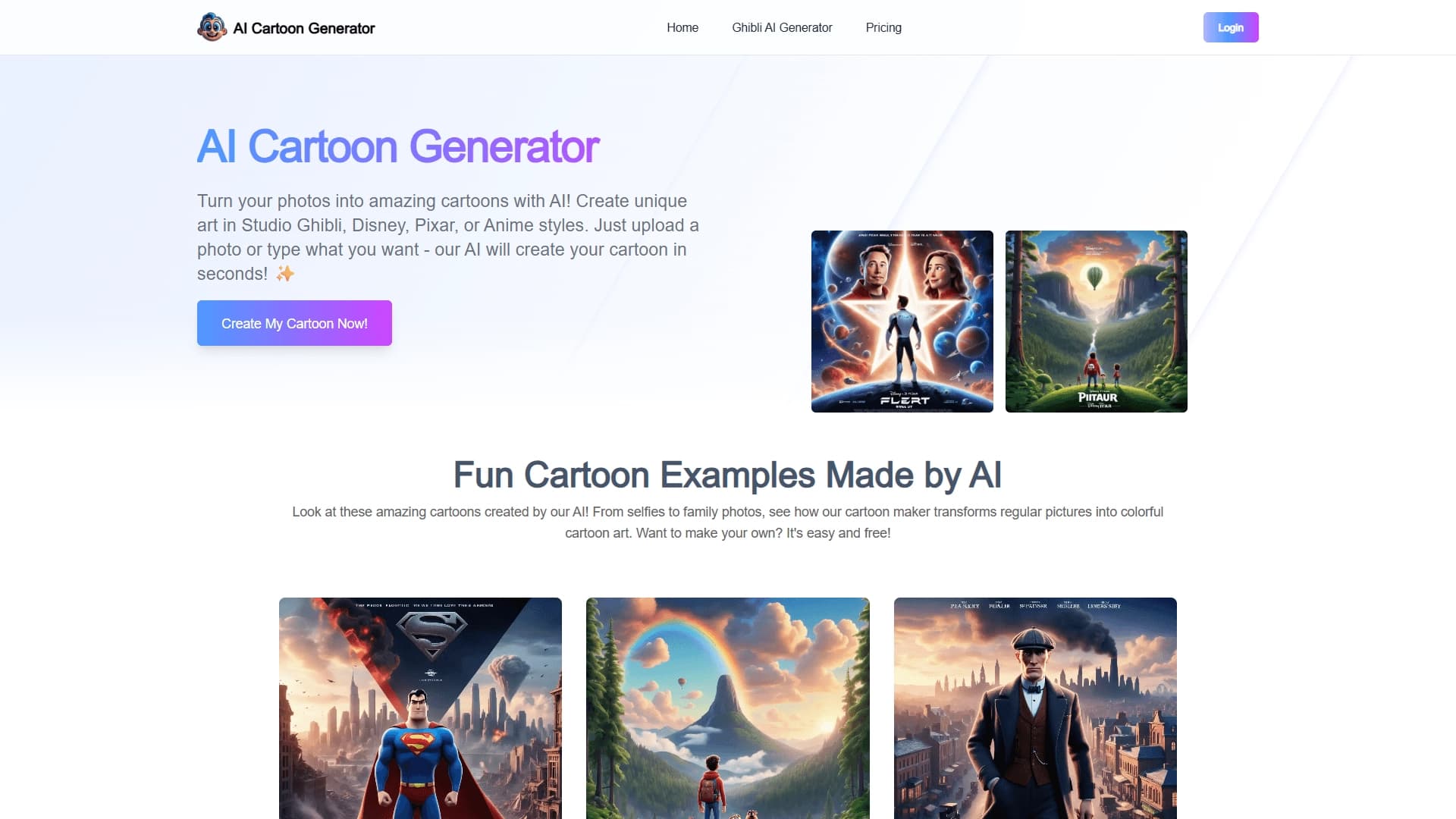
AI Cartoon Generator é um serviço web que usa redes neurais para transformar fotos regulares ou descrições de texto em imagens de estilo de desenho animado. Em vez de passar horas desenhando à mão ou aprendendo editores gráficos complexos, os usuários simplesmente carregam uma foto ou escrevem um prompt – e em segundos recebem uma arte estilizada pronta.
O serviço suporta vários estilos reconhecíveis: Disney, Pixar, Studio Ghibli e estética anime. A profundidade da transformação da imagem pode variar — desde a estilização da luz que preserva as características originais até uma conversão completa em uma ilustração em quadrinhos ou fantasia. Os usuários podem influenciar o resultado: ajustar características faciais individuais, escolher uma paleta de cores e selecionar o nível de estilização. Nenhuma habilidade de desenho é necessária para usar a ferramenta — todo o processo é construído ao carregar um arquivo, selecionar parâmetros e clicar no botão gerar.
Características do gerador de desenhos animados AI
| Característica | Valor |
|---|---|
| Tipo | Online cartoon avatar e gerador de arte |
| Categoria | Arte, geradores de imagem, ferramentas de criação de caracteres |
| Plataformas | Web (baseada no navegador) |
| Métodos de criação | A partir de uma foto ou mensagem de texto enviada |
| Estilos suportados | Disney, Pixar, Studio Ghibli, anime, estilos realistas e quadrinhos |
| Avaliação do utilizador | 4.7 de 5 |
| Avaliação editorial | 8.2 de 10 |
| Visitas mensais | 388,9K |
| Modelo de distribuição | Freemium (gratuito nível básico + assinaturas pagas) |
| Língua da interface | Disponível na versão russa |
Para quem é o AI Cartoon Generator?
Artistas e ilustradores
Profissionais podem usar o serviço como ferramenta para esboços rápidos, exploração de ideias ou criação de referências em estilo de desenho animado. A rede neural ajuda a economizar tempo em estágios de rotina e gerar uma fundação que pode então ser refinada manualmente.
Usuários regulares sem habilidades de desenho
O público principal do serviço são as pessoas que querem obter uma boa imagem de desenho animado, mas não sabem desenhar. Isso pode estar criando um avatar para redes sociais, uma imagem de perfil incomum em um mensageiro, ou apenas uma imagem divertida para entretenimento. A interface é projetada para iniciantes: não há necessidade de entender camadas, escovas ou outras ferramentas — basta carregar uma foto e escolher um estilo.
Jogadores e criadores de conteúdo
Outro caso de uso é a criação e visualização de personagens para jogos, blogs ou cartões personalizados. Os usuários podem descrever um personagem em texto ou carregar uma foto e transformá-lo em um herói de desenhos animados.
Como usar AI Cartoon Generator?
Passo 1: Envie seu material de origem
Escolha qual será a base para a geração: carregue uma foto de uma pessoa, animal ou qualquer outro objeto, ou digite uma descrição de texto do que você deseja obter. A qualidade da foto de origem afeta o resultado final — quanto mais clara e melhor iluminar a imagem, maior será a qualidade da versão dos desenhos animados.
Passo 2: Ajuste o estilo e os parâmetros
Escolha um dos estilos disponíveis: Disney, Pixar, Studio Ghibli, anime ou outro. Se necessário, ajuste características faciais individuais, cores e o nível de estilização. Isso permite que você obtenha um resultado único em vez de apenas uma imagem de modelo.
Passo 3: Executar a geração e baixar o resultado
Clique no botão "Gerar" e espere o processo terminar — geralmente leva alguns segundos. A imagem final pode ser baixada imediatamente e usada para um avatar, postar ou qualquer outro propósito. Note que uma imagem já gerada não pode ser editada — você precisará criá-la novamente para quaisquer alterações.
Principais características do AI Cartoon Generator
Convertendo fotos para estilo de desenho animado
A principal função do serviço é transformar imagens carregadas em estilo de desenho animado. Diferentes direções são suportadas: da estilização realista que preserva a semelhança com o original, a variações totalmente cômico e charmoso.
Geração a partir de descrições de texto
Em vez de uma foto, você pode usar um prompt de texto. Simplesmente descreva o caráter desejado em palavras — a rede neural criará uma imagem do zero com base nessa descrição. Isto é conveniente para criar personagens que não existem na realidade.
Estilo, característica facial e personalização de cores
Para cada imagem, você pode ajustar de forma flexível os parâmetros de geração: escolha o estilo (Disney, Pixar, Studio Ghibli, anime), características faciais individuais finas, escolha uma paleta de cores e defina o nível de estilização. Isso permite que você obtenha resultados diversos mesmo a partir de uma única foto fonte.
Vantagens do Gerador de desenhos animados AI
Velocidade e simplicidade
A geração leva apenas alguns segundos, e todo o processo consiste em três etapas: carregar um arquivo, escolher um estilo e obter o resultado. Nenhuma configuração complexa ou aprendizagem necessária — o serviço é adequado mesmo para aqueles que trabalham com redes neurais pela primeira vez.
Nível básico livre e interface intuitiva
O serviço está disponível gratuitamente com um conjunto básico de recursos, e a interface está disponível em russo. Isso o torna atraente para iniciantes e usuários que não querem pagar mais por tarefas simples.
Personalização do resultado
Ao contrário de muitos serviços similares que produzem resultados uniformes, o AI Cartoon Generator permite que você influencie a imagem final: alterar o estilo, características faciais, cores e grau de estilização. Isto proporciona espaço para a criatividade sem a necessidade de desenhar manualmente.
Desvantagens de AI Cartoon Generator
Limitações pós-processamento
A imagem terminada não pode ser editada após a geração. Se algo não estiver certo, terás de gerir a geração outra vez. O serviço também cria apenas imagens estáticas — animação não é suportada.
Dependência na qualidade da foto de origem
O resultado da transformação depende diretamente da fonte: fotos embaçadas, escuras ou mal cortadas podem produzir versões medíocres de desenhos animados. A qualidade da imagem é uma condição importante para um bom resultado.
Limitações de acesso e transparência
Apesar da disponibilidade de um nível livre, algumas fontes carecem de informações detalhadas sobre preços e termos de assinatura, o que pode ser confuso para potenciais usuários.
Que tarefas o AI Cartoon Generator resolve?
Criando avatares para mídias sociais
Uma das tarefas mais populares é transformar uma foto regular em um avatar de desenhos animados elegante para perfis de mídia social, mensageiros ou fóruns. Tal imagem parece incomum e atrai atenção.
Desenvolvimento de personagens para jogos e projetos
O serviço é adequado para criar personagens de desenho animado: você pode descrever um herói em texto ou usar uma foto, e a rede neural irá criar uma imagem adequada. Isso é útil para projetar jogos, blogs ou projetos criativos.
Entretenimento e criação de conteúdo
AI Cartoon Generator também é usado para se divertir: transformando suas fotos em retratos de desenhos animados, gerando imagens para cartões, mensagens de mídia social, ou apenas para curiosidade. O serviço fornece uma maneira rápida de obter visuais incomuns sem contratar um designer.
Preço do gerador de desenhos animados AI
O AI Cartoon Generator opera em um modelo freemium, embora a informação sobre preços varie entre as fontes. De acordo com alguns dados, o serviço está posicionado como completamente livre. De acordo com outros, há um nível básico livre com um conjunto limitado de recursos, uma assinatura premium com acesso a estilos e configurações estendidas, e um nível profissional oferecendo máxima qualidade, suporte prioritário e personalização estendida.
Tenha em mente que os preços atuais e detalhes do plano podem mudar, então é recomendável verificar as informações no site oficial do serviço antes de se inscrever.
Termos de uso para AI Cartoon Generator
O serviço não limita o número de imagens geradas — os usuários podem criar quantas imagens precisarem. Quanto ao uso comercial, é formalmente permitido, mas para a distribuição de massa, especialmente quando a impressão em mercadoria, é recomendável rever o acordo do usuário para garantir que não haja restrições.
Uma característica importante é a incapacidade de desfazer mudanças. Após a geração estar completa, você não pode retornar às versões intermediárias, então, ao trabalhar com imagens importantes, vale a pena salvar suas fontes e estar preparado para regenerar se necessário.
Disponibilidade do gerador de desenhos animados AI
A ferramenta funciona online através do site aicartoongenerator. net e não requer nenhuma instalação de software adicional. Tudo o que você precisa é de um navegador e acesso à internet.
A interface suporta o russo, o que facilita o trabalho dos usuários de língua russa.
Como AI Cartoon Generator difere de alternativas
A principal diferença entre AI Cartoon Generator e muitos serviços similares é a combinação de vários fatores. Primeiro, ele suporta uma ampla gama de estilos reconhecíveis: Disney, Pixar, Studio Ghibli e anime. Nem todas as ferramentas concorrentes oferecem uma seleção de estética de estúdio em um só lugar.
Segundo, a geração funciona tanto a partir de fotos e descrições de texto. Muitas alternativas são limitadas a apenas um desses métodos de criação, enquanto aqui os usuários podem escolher a opção mais conveniente.
Em terceiro lugar, configurações flexíveis (características faciais, cores, nível de estilização) combinadas com uma interface simples e uma camada básica gratuita tornam o serviço acessível a um público amplo. Alternativas incluem Genroom, Claid AI, PhotoAiD, RoomGPT, Shotix, New Profile Pic, Nero AI Image Upscaler, entre outros, mas cada um tem suas próprias limitações em termos de estilos, métodos de geração ou custo.
Conclusão
AI Cartoon Generator é uma ferramenta online prática para transformar rapidamente fotos e descrições de texto em imagens de desenhos animados. Ele se adapta a artistas e usuários regulares sem habilidades de desenho, oferece estilos populares (Disney, Pixar, Studio Ghibli, anime), configurações flexíveis e geração instantânea. O serviço lida com tarefas como criar avatares, personagens de jogos e conteúdo criativo para mídias sociais. Ao mesmo tempo, suas limitações devem ser consideradas: a incapacidade de editar resultados, a dependência da qualidade da foto da fonte e a transparência limitada em relação aos preços. No geral, é uma solução conveniente para quem quer rapidamente obter imagens de desenhos animados de alta qualidade sem aprender editores gráficos complexos.
Perguntas mais frequentes
Consulte também


Plataforma baseada em IA para criar e editar imagens de produtos e vídeos para vendedores de comércio eletrônico.


ComicLLM é uma ferramenta de IA para criar quadrinhos a partir de descrições de texto ou modelos prontos.


Ferramenta web gratuita do Google que usa aprendizado de máquina para transformar esboços brutos em ícones e ilustrações organizados.


Serviço de prova virtual de roupas com IA.

Serviço para criar avatares personalizados e sessões de fotos com IA com base em selfies enviadas.


Plataforma de geração para criar imagens realistas e vídeos curtos de texto ou imagens com controle sobre estilo e movimento da câmera.


Ferramenta online para criar deepfakes e editar imagens com IA.

Plataforma web para geração de imagens e vídeos cinematográficos com IA, incluindo ferramentas de edição em estúdio.