

AI Audio Kit
app macOS qui convertit l'audio en texte en utilisant le Whisper d'OpenAI.
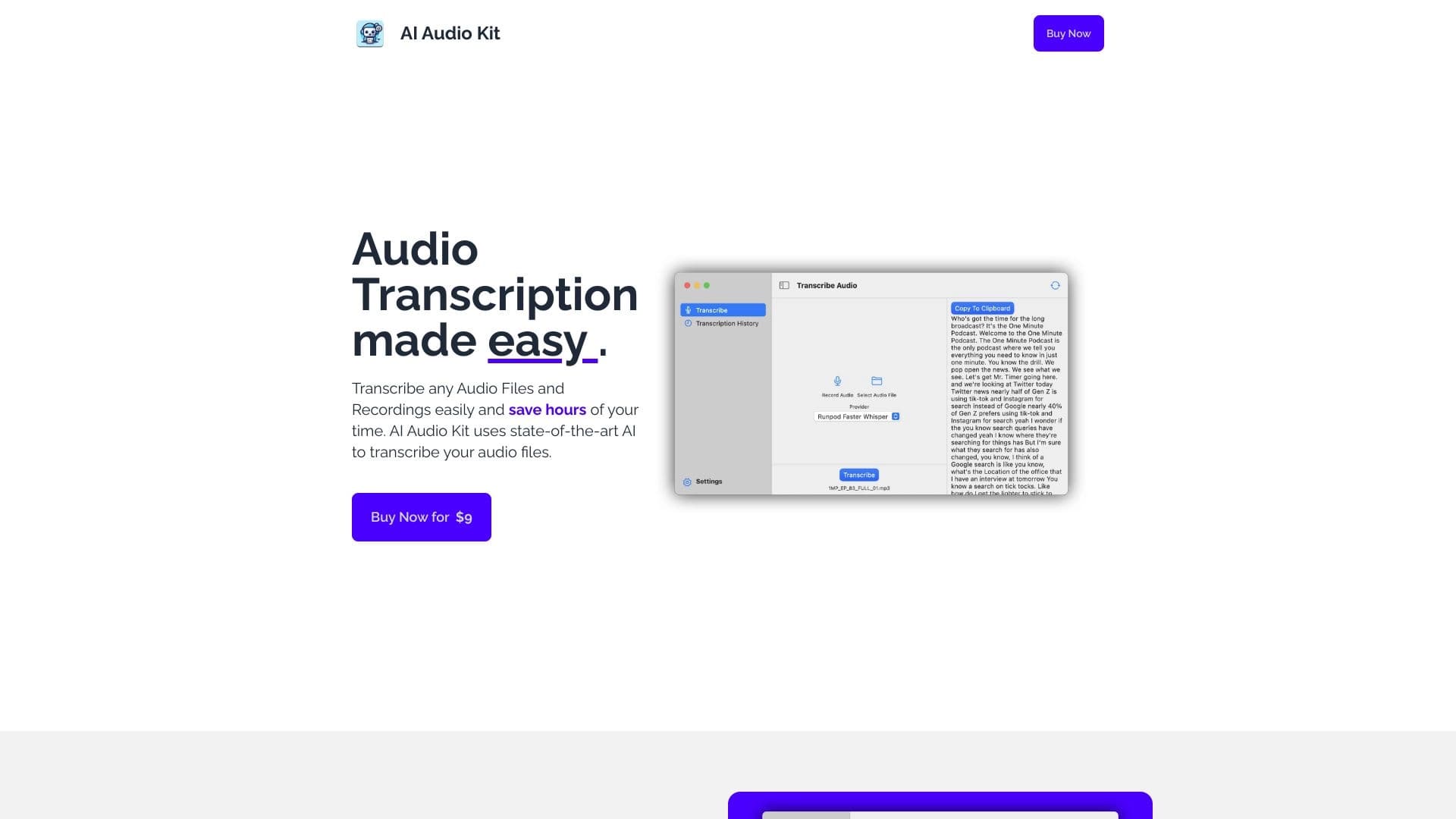
Aperçu général
AI Audio Kit Neural Network Description
AI Audio Kit est une application spécialisée pour le système d'exploitation macOS qui convertit automatiquement les enregistrements audio en texte. L'outil est construit sur la technologie Whisper d'OpenAI, connue pour sa grande précision dans la reconnaissance vocale. L'application est conçue pour les utilisateurs qui travaillent régulièrement avec des fichiers vocaux : interviews, conférences, podcasts ou mémos vocaux.
L'une des principales caractéristiques du kit audio AI est son approche globale du traitement audio. En plus de la transcription standard, l'application vous permet d'enregistrer l'audio directement à l'intérieur et instantanément obtenir du texte prêt, ainsi que de créer de brefs résumés à partir d'enregistrements longs. L'historique de toutes les transcriptions est enregistré, ce qui est pratique pour la recherche ultérieure et travailler avec des matériaux.
Il est important de noter que AI Audio Kit est une solution basée sur le cloud. Le traitement des fichiers nécessite une connexion Internet stable et une clé API valide, car les calculs sont effectués sur les serveurs plutôt que sur l'appareil local.
Caractéristiques du kit audio AI
| Fonctionnalité | Valeur |
|---|---|
| Type | Application macOS |
| Catégorie | Outils de transcription audio |
| Technologie | API Whisper depuis OpenAI |
| Développeur | Mukhtar C M |
| Plan de base | Prix de départ |
| Plan professionnel | Abonnement mensuel |
| Plan d'entreprise | Prix sur mesure |
| Modèle de distribution | Paiement |
| Visites mensuelles | 42,7 K |
| Langues d'interface | Non spécifié |
| Restrictions régionales | Aucun identifié |
Pour qui le kit audio AI convient-il?
AI Audio Kit s'adresse aux utilisateurs macOS qui ont souvent besoin de convertir la langue parlée en texte écrit. Le service sera utile pour un certain nombre de groupes professionnels.
Journalistes et rédacteurs en chef
Pour les professionnels des médias, cet outil permet une transcription rapide des interviews, des commentaires d'experts et des conférences de presse. Au lieu de passer des heures à taper du texte manuellement, un journaliste obtient une transcription prête en quelques minutes et peut se concentrer sur l'écriture du matériel.
Étudiants et chercheurs
Pour les apprenants et le personnel académique, l'application sera un assistant dans le traitement des conférences et des séminaires. AI Audio Kit transforme de longs enregistrements audio de classes en notes de texte structurées qui sont pratiques pour résumer, organiser et utiliser lors de la préparation aux examens.
Professionnels travaillant avec des enregistrements de voix
Cela inclut les podcasters, les créateurs de contenu et toute personne qui travaille régulièrement avec des fichiers vocaux. La fonction de création de résumé permet d'extraire rapidement l'essence des longs enregistrements sans avoir de les écouter pleinement.
Comment utiliser le kit audio AI?
Le processus de travail avec l'application ne nécessite aucune compétence technique particulière et se compose de quelques étapes simples.
Installation et configuration
Tout d'abord, vous devez télécharger l'application depuis une source officielle et l'installer sur votre Mac. Après le lancement, l'utilisateur devra saisir une clé API valide depuis OpenAI — c'est une condition obligatoire pour que le service fonctionne, puisque le traitement des données se déroule dans le cloud.
Téléchargement et transcription
L'interface de l'application vous permet de télécharger un fichier audio dans un format pris en charge ou d'enregistrer le son directement dans l'application. Après ça , le système envoie automatiquement les données pour le traitement et produit un fichier texte prêt. Si l'enregistrement est long, vous pouvez utiliser la fonction de résumé pour obtenir le contenu principal sans transcription complète.
Principales caractéristiques du kit audio AI
AI Audio Kit offre un ensemble de fonctionnalités qui couvrent le cycle complet de travail avec le contenu audio, de l'enregistrement à l'obtention d'un résultat texte.
Transcription et enregistrement rapides
L'application permet de transcrire les fichiers audio existants, ainsi que d'enregistrer la voix directement dans l'application avec sortie de texte instantanée. Ceci est pratique pour capturer rapidement des pensées ou des idées sans utiliser des enregistreurs de voix tiers.
Travailler avec plusieurs fournisseurs d'API
Les utilisateurs peuvent connecter non seulement Whisper d'OpenAI mais aussi d'autres fournisseurs d'API, offrant une flexibilité dans le choix d'un service de traitement en fonction des besoins ou des préférences.
Histoire et résumé de la transcription
Toutes les transcriptions complètes sont enregistrées dans l'histoire, vous permettant de revenir à eux. En outre, le fait de condenser de longs enregistrements audio en brefs résumés permet d'économiser du temps en travaillant avec des matériaux volumineux — conférences, présentations ou réunions.
AI Audio Kit Avantages
L'outil a un certain nombre de forces qui le rendent populaire parmi les propriétaires de Mac travaillant avec du contenu audio.
Haute vitesse et économie de temps
Grâce au traitement en nuage, l'application vous permet d'obtenir du texte audio en quelques minutes. L'utilisateur n'a pas besoin d'écouter les enregistrements manuellement et de taper du texte, ce qui accélère considérablement le travail et élimine les tâches courantes.
Précision de la reconnaissance et facilité d'utilisation
La technologie Whisper d'OpenAI démontre une grande précision de reconnaissance de la parole même avec le bruit de fond, les accents et la prononciation non standard. Dans le même temps, l'interface de l'application est intuitive, la configuration ne nécessite aucune action complexe, et le programme lui-même est parfaitement intégré dans l'écosystème macOS.
Kit audio AI Inconvénients
Avec les avantages, le service a des limites à considérer avant de commencer à l'utiliser.
Dépendance sur Internet et Cloud
AI Audio Kit nécessite une connexion Internet stable pour fonctionner. Cela rend l'utilisation hors ligne impossible. En outre, tous les fichiers audio sont traités dans le cloud, ce qui peut soulever des préoccupations pour les utilisateurs préoccupés par la confidentialité de leurs données.
Limites de la plate-forme
L'application est disponible exclusivement pour macOS. Les utilisateurs de Windows ou Linux ne pourront pas utiliser cet outil. Il n'existe pas non plus d'information officielle sur le support des appareils mobiles ou d'une version Web.
Quelles tâches le kit audio AI se résout-il?
L'objectif principal de l'outil est d'automatiser le processus de transcrire l'audio dans le texte, ce qui permet de résoudre un large éventail de tâches pratiques.
Transcription des entrevues, des podcasts et des notes
L'application gère efficacement la conversion d'entrevues, podcasts, notes vocales et tout autre enregistrement audio où la parole exacte capture les choses dans le texte.
Convertir des conférences et créer des résumés
Le service transforme les conférences, présentations et séminaires en notes de texte structurées qui sont pratiques à utiliser plus tard. La fonction de création sommaire permet de mettre en évidence les points clés des longs enregistrements sans les écouter complètement.
Tarifs des kits audio AI
Le coût d'utilisation du service dépend du plan choisi. Le développeur propose plusieurs options pour différentes catégories d'utilisateurs.
Plans de tarification
Actuellement, trois plans sont disponibles: Basic, Professional avec abonnement mensuel, et Enterprise, dont le coût est calculé individuellement pour des tâches et des volumes spécifiques. En outre, la FAQ officielle mentionne la possibilité d'acheter une licence qui , selon la description, comprend toutes les fonctionnalités de l'application, mises à jour et support.
Conditions d'utilisation du kit audio AI
Pour que l'application fonctionne correctement, l'utilisateur doit remplir un certain nombre de conditions obligatoires.
Connexion et principales exigences
Une exigence obligatoire est d'avoir une clé API valide et un accès Internet. Sans connexion réseau, le traitement des fichiers est impossible, car tous les calculs sont effectués sur des serveurs distants. De plus, il convient de noter que l'utilisation active peut entraîner des coûts pour les appels API depuis OpenAI.
Considérations relatives au traitement des données
Les utilisateurs doivent tenir compte du fait que les fichiers audio sont transmis au cloud pour traitement. Cela impose certaines restrictions à l'utilisation du service pour le travail avec des documents confidentiels.
Disponibilité du kit audio AI
L'application est exclusivement destinée aux utilisateurs de macOS. L'information sur le soutien linguistique de l'interface et les restrictions régionales n'est pas divulguée officiellement. On ne sait pas non plus si le développeur prévoit publier des versions pour d'autres systèmes d'exploitation ou pour un client Web. Cela fait de l'outil une solution de niche qui sera utile principalement aux propriétaires d'ordinateur Apple.
Comment le kit audio d'IA diffère des alternatives
La principale différence de AI Audio Kit réside dans sa spécialisation étroite et son intégration profonde avec la plateforme macOS. L'outil n'essaie pas de couvrir toutes les plateformes possibles, mais se concentre sur la fourniture d'un service de qualité et pratique spécifiquement pour les propriétaires de Mac. Contrairement aux services en ligne universels qui fonctionnent dans un navigateur, l'application offre une interface native, ainsi qu'une fonction d'enregistrement et de transcription simultanée intégrée. La combinaison de la technologie Whisper d'OpenAI, la possibilité de connecter plusieurs fournisseurs d'API, et l'économie d'historique avec des fonctionnalités de résumé en fait une solution de transcription complète, la mettant à l'écart de simples convertisseurs qui ne effectuent que la transcription de base.
Conclusion
AI Audio Kit est une application macOS spécialisée qui résout rapidement et avec une grande précision la tâche de transcrire l'audio dans le texte en utilisant la technologie Whisper depuis OpenAI. Les principaux avantages sont la vitesse de traitement, une interface claire, l'enregistrement intégré avec transcription instantanée, et la capacité de créer des résumés. Les principales limitations sont la liaison avec la plate-forme Apple, connexion internet obligatoire pour le fonctionnement, et traitement des données en nuage, qui est important à considérer pour les utilisateurs travaillant avec des informations sensibles.
Foire aux questions
Voir aussi


Un add-in pour Microsoft Word qui utilise des réseaux neuronaux pour automatiser la création, l'édition et l'analyse de contrats juridiques.

Une boîte à outils multimédia d'IA pour l'édition et l'amélioration des photos, vidéos et documents PDF.

Un réseau neuronal pour l'analyse de documents qui extrait des informations clés, crée des résumés et répond aux questions sur le contenu des fichiers téléchargés.


Bleepify détecte automatiquement et bleeps profanity en vidéo et audio.

Plateforme d'IA multifonctionnelle pour la création de contenu, combinant synthèse vocale, génération de texte, création d'avatar et montage vidéo.
Outil pour traduire du texte directement en images tout en préservant le design original.

Plate-forme Cloud pour la création de vidéos utilisant des avatars AI, la synthèse de la parole et la traduction automatique de clips dans des dizaines de langues.


Assistant d'IA multifonctionnel pour la génération de textes, d'images et d'audio.