

AI Addition Learning Helper
Formateur en ligne pour la pratique des compétences supplémentaires avec vérification automatique et génération de tâches.
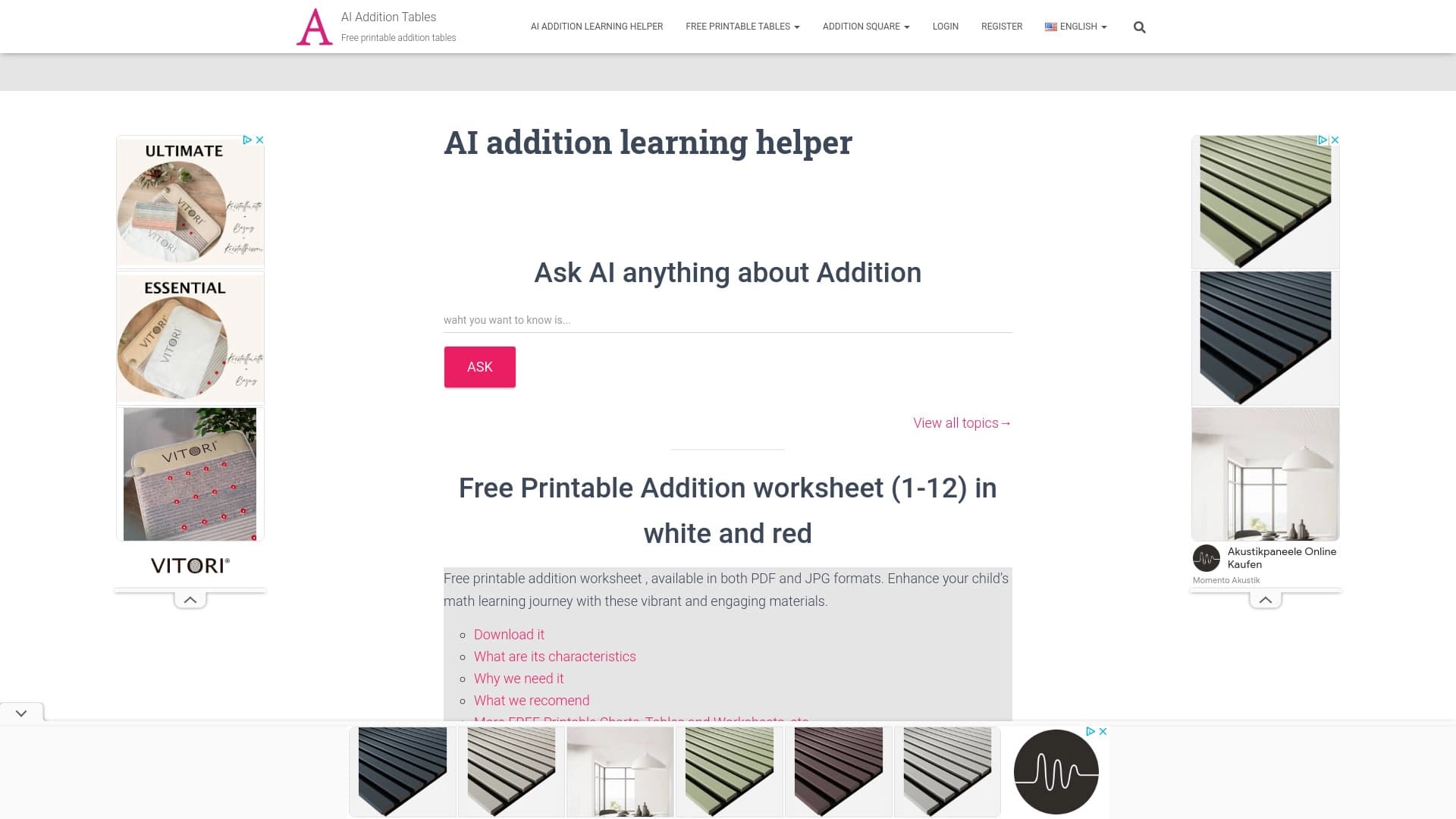
Aperçu général
AI Addition Learning Helper est un service web hautement spécialisé conçu pour aider les enfants à acquérir des compétences supplémentaires. L'objectif principal de l'outil est de fournir aux enfants, aux parents ou aux enseignants la capacité de générer rapidement des problèmes de mathématiques, de les résoudre et de recevoir une vérification automatique instantanée. Le service fonctionne selon le principe « entrer dans un problème — obtenir la réponse », ce qui rend extrêmement simple à utiliser même pour les jeunes élèves du primaire.
En plus du mode interactif, la plateforme offre une vaste bibliothèque de matériel éducatif gratuit. Les utilisateurs peuvent télécharger et imprimer des feuilles de travail, des tableaux et des cartes de tâches pour la pratique hors ligne. Cela permet d'utiliser le service non seulement comme formateur en ligne, mais aussi comme générateur de documents pour les leçons de classe ou la pratique à domicile. Le projet vise principalement à aider les adultes à préparer et à vérifier les problèmes de mathématiques pour les enfants d'âge préscolaire jusqu'à la quatrième année.
AI Addition Apprentissage Helper Caractéristiques
| Fonctionnalité | Valeur |
|---|---|
| Type | Outil éducatif |
| Catégorie | Divers |
| Plateforme | Site Web |
| Développeur | AdditionTables.com |
| Visites mensuelles | 38,1 K |
| Modèle de distribution | Gratuit |
| Objectif | Pratique supplémentaire |
Pour qui est AI Addition Apprentissage Helper?
Parents et enseignants du primaire
Le service est conçu pour les adultes qui aident les enfants à maîtriser l'arithmétique de base. Les parents peuvent l'utiliser de générer rapidement des problèmes de pratique et de vérifier les devoirs sans recalculer tout eux-mêmes. Les enseignants obtiennent un outil pratique pour préparer des tests et des exercices de pratique pour les leçons, gagner du temps sur la création d'affectations.
Enfants de la maternelle à la quatrième année
La plateforme s'adresse aux jeunes apprenants qui font leurs premiers pas dans l'apprentissage complémentaire. Le format interactif avec rétroaction instantanée aide les enfants à voir immédiatement si leur réponse est correcte, ce qui les maintient engagés dans l'apprentissage. L'interface simple permet à un enfant d'entrer dans les problèmes et d'obtenir des réponses indépendamment, sans assistance aux adultes.
Tuteurs et nounous
L'outil est également utile pour les tuteurs privés et autres professionnels travaillant avec les jeunes enfants. La possibilité de télécharger des feuilles de travail illimitées facilite la diversification des leçons et l'adaptation des matériaux à un enfant spécifique.
Comment utiliser AI Addition Apprentissage Helper
Mode de vérification en ligne
Pour commencer, il suffit d'ouvrir le site de service et d'entrer un problème d'ajout dans le champ désigné. Le système traite instantanément la requête et fournit la réponse correcte. Si un enfant fait une typographie lors de l'entrée du problème, le résultat peut être incorrect, de sorte que les adultes doivent surveiller l'exactitude de l'entrée. Ce mode est adapté pour des vérifications rapides des connaissances ou la réalisation de devoirs.
Téléchargement de matériel pratique
Les utilisateurs peuvent naviguer dans la section du matériel éducatif et télécharger gratuitement des feuilles de travail, des tableaux supplémentaires et des cartes de tâches. Tous les imprimés sont disponibles en quantités illimitées et sont régulièrement mis à jour. Les fichiers téléchargés peuvent être utilisés pour la pratique hors ligne à la maison ou en classe, ainsi que pour la préparation aux tests.
Planification des leçons
Les adultes peuvent utiliser le service pour structurer une leçon : d'abord, examiner le sujet en utilisant des tableaux, puis résoudre plusieurs problèmes en ligne, et enfin renforcer les résultats avec une feuille de travail. Cette approche globale couvre toutes les étapes de l'apprentissage, de l'explication à la pratique indépendante.
Principales caractéristiques de AI Addition Apprentissage Helper
Résoudre tout problème d'addition
Le service peut traiter des problèmes de toute difficulté dans le cadre de l'ajout. L'utilisateur entre des nombres, et le système retourne instantanément le résultat correct. Cela élimine la nécessité d'utiliser une calculatrice ou de vérifier les réponses manuellement.
Production et fourniture de feuilles de travail
La plate-forme permet d'accéder à une collection d'imprimables gratuits : feuilles de travail, tableaux, graphiques et cartes pour une pratique supplémentaire. Les matériaux sont adaptés à l'âge et au niveau de compétence des enfants, ce qui facilite le choix des tâches appropriées pour un enfant spécifique.
Vérification automatique des réponses
L'outil assume le rôle de vérifier l'exactitude des solutions. Un enfant voit l'erreur immédiatement après avoir entré une réponse, ce qui l'aide à analyser ses actions et à apprendre des erreurs. Pour les enseignants, c'est un moyen de vérifier rapidement un grand nombre de problèmes sans calcul manuel.
Avantages de l'aide pédagogique supplémentaire à l'IA
Format d'apprentissage interactif
Les enfants restent engagés parce qu'ils reçoivent une rétroaction instantanée sur chaque action. Les erreurs sont visibles immédiatement, rendant le processus d'apprentissage plus conscient. Les tâches peuvent être facilement modifiées, avec de nouveaux problèmes sélectionnés à chaque fois.
Matériel d'entraînement libre
Les feuilles de travail et les tableaux peuvent être téléchargés et imprimés en toutes quantités. Cela réduit considérablement les dépenses consacrées aux fournitures éducatives. Le matériel est régulièrement mis à jour, ce qui permet d'utiliser de nouvelles tâches à chaque session.
Polyvalence pour les adultes
L'outil convient à la fois aux parents et aux enseignants. La vérification automatique permet d'économiser du temps, et la possibilité de sélectionner les tâches par niveau de difficulté aide à identifier et à combler les lacunes dans les connaissances de l'enfant. La rapidité d'obtenir des réponses rend le service pratique pour travailler avec un groupe d'enfants.
Inconvénients de l'aide d'apprentissage supplémentaire à l'IA
Limité à un seul sujet
Le service fonctionne exclusivement avec addition. La multiplication, la soustraction et la division ne sont pas prises en charge, ce qui rend l'outil inadapté à l'enseignement complet des mathématiques. Des ressources supplémentaires seront nécessaires pour couvrir d'autres opérations arithmétiques.
Pas de parcours d'apprentissage individualisé
Les tâches du service sont normalisées et ne s'adaptent pas à un étudiant particulier. Il n'est pas possible d'ajuster la difficulté ou le nombre de problèmes aux besoins individuels de l'enfant. Le système ne suit pas les progrès ni n'établit de plans d'apprentissage personnalisés.
Sensibilité aux erreurs d'entrée
L'exactitude de la réponse dépend entièrement de l'exactitude du problème saisi. Si un enfant mélange accidentellement un chiffre ou un symbole, le système produira un résultat incorrect. Les adultes doivent surveiller le processus d'entrée, ce qui réduit l'autonomie d'utilisation pour les enfants.
Quels problèmes l'aide d'apprentissage supplémentaire à l'IA résout-elle?
Enseignement aux enfants
Le service agit comme un formateur fiable pour exercer des compétences supplémentaires. La pratique régulière avec l'outil aide les enfants à mémoriser la table d'addition plus rapidement et à apprendre à calculer sans erreurs.
Préparation du matériel pédagogique
Les enseignants et les parents économisent du temps pour créer des devoirs et des cours. Les feuilles de travail et les cartes prêtes à l'emploi peuvent être téléchargées en quelques minutes et utilisées immédiatement — sans longue préparation ni recherche sur Internet.
Évaluation automatique des connaissances
L'outil gère la vérification de routine d'un grand nombre de problèmes. Cela permet aux adultes de se concentrer sur l'explication du matériel et l'analyse des erreurs d'un enfant plutôt que de recalculer les résultats.
Identification des lacunes dans les connaissances
Le recours régulier au formateur permet de constater quels types de problèmes causent des difficultés à un enfant. En observant les erreurs, les parents et les enseignants peuvent ajuster le plan de leçon et accorder plus d'attention aux problèmes.
AI Addition Aide à l'apprentissage Tarifs
Le service offre trois plans de tarification pour différentes catégories d'utilisateurs:
- Plan gratuit — comprend les caractéristiques de base de la résolution des problèmes et l'accès au matériel éducatif gratuit. Convient pour se familiariser avec l'outil et accomplir des tâches simples.
- Plan éducatif — débloque l'accès à tous les matériaux et feuilles de travail du site. Recommandé aux parents et aux enseignants qui utilisent activement la ressource pour préparer les leçons.
- Régime de primes — offre un accès illimité à toutes les fonctions de service et au soutien prioritaire des utilisateurs. S'adresse aux éducateurs professionnels et à ceux qui ont besoin d'une fonctionnalité maximale.
Conditions d'utilisation pour AI Addition Apprentissage Helper
Pour une utilisation de base du service, il suffit d'entrer un problème dans le champ sur la page principale du site. L'inscription n'est pas mentionnée comme une exigence obligatoire pour travailler avec le formateur en ligne, permettant aux utilisateurs de commencer à pratiquer sans créer de compte. Des fonctionnalités plus avancées, notamment le téléchargement de documents supplémentaires et le soutien prioritaire, peuvent nécessiter un abonnement payant sur l'un des plans. Aucune exigence matérielle ou logicielle spécifique n'est énoncée — un navigateur web standard suffit.
Disponibilité de l'aide d'apprentissage supplémentaire à l'IA
Le service est disponible exclusivement en tant que site Web et n'a pas d'applications mobiles pour iOS ou Android. La page ne contient aucune mention de restrictions régionales ou de la nécessité d'utiliser un VPN, suggérant que l'outil est accessible aux utilisateurs de différents pays. Une connexion Internet stable est nécessaire pour la pleine utilisation du formateur; toutefois, les feuilles de travail téléchargées peuvent être utilisées hors ligne après impression.
Comment AI Addition Apprentissage Helper diffère des alternatives
La principale différence par rapport aux plateformes éducatives universelles est sa spécialisation étroite. Au lieu d'essayer de couvrir toutes les opérations arithmétiques, outil se concentre exclusivement sur ajouter. Cela permet au processus d'être le plus profond et le plus raffiné possible — des problèmes simples aux combinaisons complexes de nombres.
La deuxième différence clé est l'absence totale d'enregistrement pour une utilisation de base. La plupart des services similaires nécessitent la création d'un compte pour accéder même à des fonctionnalités minimales. Ici, les utilisateurs peuvent commencer à travailler instantanément en ouvrant simplement le site Web.
La troisième caractéristique est le format d'apprentissage hybride. AI Addition Learning Helper combine un mode en ligne interactif avec des matériaux imprimés hors ligne classiques. Cette approche permet aux adultes de structurer les leçons comme ils le jugent bon, sans se limiter au temps d'écran, et donne aux enfants la possibilité de travailler avec des cartes physiques.
Conclusion
AI Addition Learning Helper est un outil pratique et hautement spécialisé pour la pratique des compétences supplémentaires chez les jeunes enfants. Il sera utile pour les parents et les enseignants de l'école primaire qui doivent préparer rapidement les affectations et vérifier automatiquement leur achèvement. Le plan gratuit avec accès aux feuilles de travail rend le service abordable pour tout budget. Dans le même temps, l'outil se limite à l'addition et n'offre pas de voies d'apprentissage individualisées, de sorte que des ressources supplémentaires seront nécessaires pour un développement mathématique complet. Dans sa niche — pratique d'addition — le service accomplit bien ses tâches et sans complexité inutile.
Foire aux questions
Voir aussi

AllChat est une plateforme universelle qui combine plusieurs modèles de langage populaires dans une interface unique pour la communication, la génération d'images, l'analyse de fichiers et l'exécution de code.

Un service de création de présentation qui utilise plusieurs agents d'IA pour la collecte d'information, la conception et l'analyse de données.

Une boîte à outils multimédia d'IA pour l'édition et l'amélioration des photos, vidéos et documents PDF.

Plateforme d'IA multifonctionnelle pour la création de contenu, combinant synthèse vocale, génération de texte, création d'avatar et montage vidéo.

Un réseau neuronal pour l'analyse de documents qui extrait des informations clés, crée des résumés et répond aux questions sur le contenu des fichiers téléchargés.

Catalogue d'outils d'IA avec du matériel pédagogique et des guides pour sélectionner les réseaux neuronaux.

Plate-forme Cloud pour la création de vidéos utilisant des avatars AI, la synthèse de la parole et la traduction automatique de clips dans des dizaines de langues.

Agent d'IA pour automatiser les actions courantes du navigateur, comme remplir des formulaires et recueillir des données.