

AdsCreator.com
Service alimenté par l'IA pour la génération automatique de créations publicitaires pour Meta, Google et Stories.
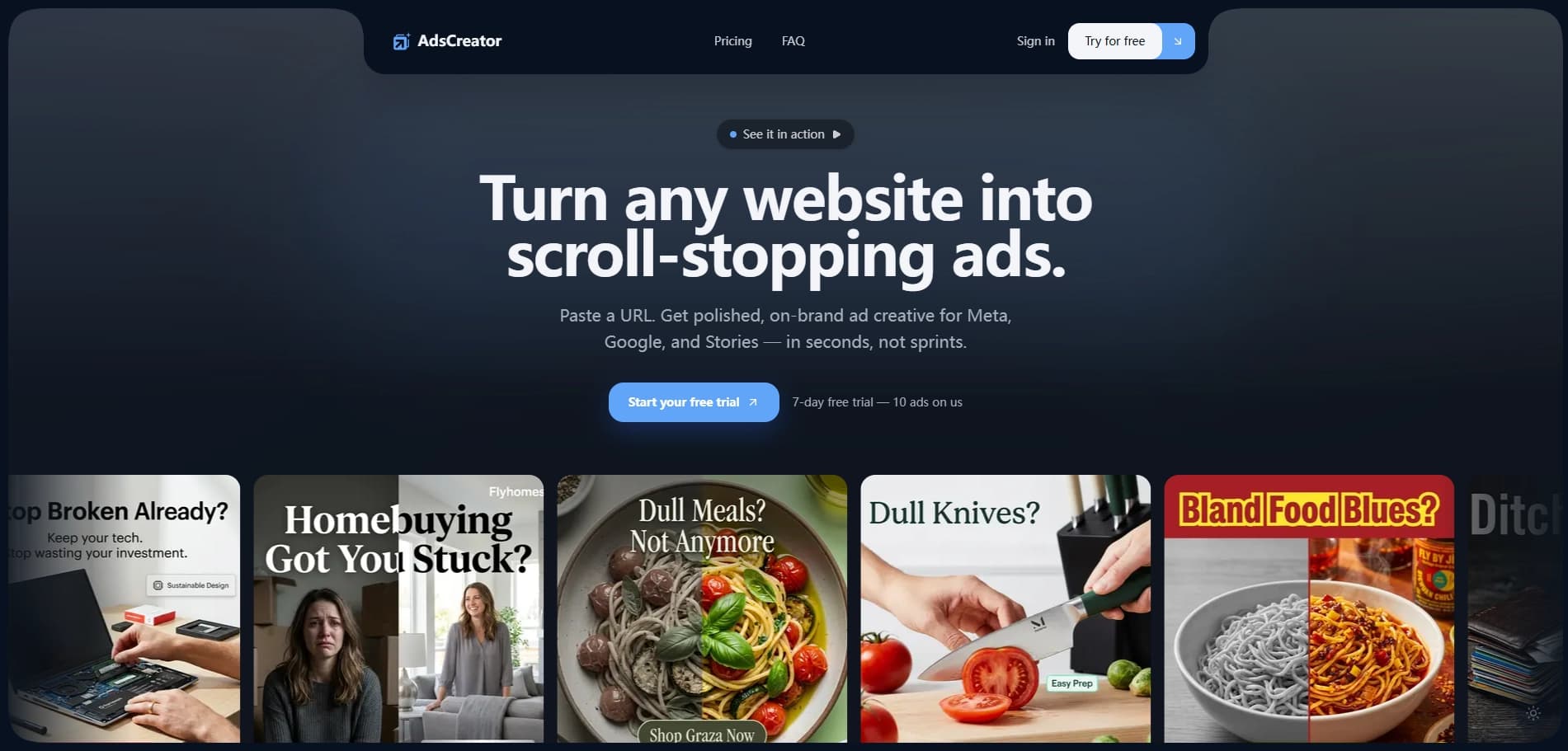
Aperçu général
AdsCreator.com est un service en ligne alimenté par l'intelligence artificielle, conçu pour la génération automatique de publicité créative. L'idée principale de la plateforme est de simplifier et d'accélérer le processus de création d'annonces pour les campagnes de marketing autant que possible, en supprimant le travail manuel d'un concepteur.
L'algorithme du service analyse la structure, le style visuel et le contenu textuel du site Web de l'utilisateur. Sur la base de cette analyse, le réseau neuronal extrait les éléments clés de l'identité de la marque : couleurs de marque, polices utilisées et tonalité de communication. Une fois l'analyse terminée, le système construit un soi-disant « panneau de marque », un ensemble de règles et d'éléments utilisés pour générer de nouvelles créations publicitaires prêtes à être publiées.
Cette approche permet la création d'annonces pour des plateformes telles que Meta (Facebook et Instagram), Google et Stories, qui correspondent de façon styliste à l'identité de la marque de l'entreprise. L'utilisateur n'a pas besoin de concevoir manuellement des mises en page ou de sélectionner des images — il suffit de fournir l'URL du site Web est suffisant, et le système proposera des options prêtes à l'emploi. Ceci est particulièrement utile pour tester rapidement plusieurs variations publicitaires, qui est critique pour l'optimisation de campagne sans impliquer un concepteur à chaque étape.
AdsCreator.com Caractéristiques
| Caractéristiques | Valeur |
|---|---|
| Type de produit | Générateur de publicités AI / Création de publicités AI |
| Plateforme | Application Web |
| Modèle de tarification | Essai gratuit, abonnement payant |
| Coût minimum | à partir de 24 $/mois |
| Plan gratuit | Non, seulement une période d'essai de 7 jours (10 annonces) |
| Formats pris en charge | Carré, paysage, histoire (pour Meta, Google) |
| Utilisation primaire | Création publicitaire |
| Date d'ajout au catalogue | 30 mars 2026 |
Qui est AdsCreator.com pour?
Ce service s'adresse à un large éventail de professionnels travaillant avec le marketing numérique. Son objectif principal est d'économiser du temps et des ressources sur la production de contenu, rendant l'outil utile pour quiconque a besoin de créer régulièrement des publicités visuelles.
Marchés et responsables des médias sociaux
Les marketeurs numériques et les gestionnaires SMM peuvent obtenir des jeux publicitaires prêts pour les tests A/B en quelques minutes. Au lieu d'attendre des conceptions d'un concepteur ou d'approuver des révisions, un professionnel du marketing peut générer indépendamment des dizaines de variations publicitaires, tester rapidement des hypothèses et évaluer des solutions réussies.
Propriétaires et startups d'entreprise
Les entrepreneurs sans expérience de conception ont accès à un outil accessible pour créer des annonces professionnelles. Cela est particulièrement pertinent pour les petites entreprises sans budget pour embaucher des entrepreneurs. Avoir un site actif est suffisant pour obtenir des créations de qualité sans plonger dans des logiciels complexes.
Agences et équipes de commerce électronique
Pour les agences de marketing et les départements du commerce électronique, l'intégration de la marque dans les processus automatisés est essentielle. Les fonctions de production de masse et de collaboration d'équipe permettent de produire de grands volumes de créations pour plusieurs clients simultanément, ce qui influe directement sur la vitesse et l'efficacité. Les créateurs de contenu et les influenceurs peuvent également utiliser le service pour créer du matériel promotionnel dans un style cohérent.
Comment utiliser AdsCreator.com
La plateforme fonctionne sur le principe "de l'analyse à l'exportation". Il ne nécessite aucune compétence technique particulière et se compose de six étapes successives.
Étape 1: Télécharger votre site Web
La première et principale étape est de coller votre URL de site Web dans le champ désigné sur la plate-forme. C'est le point de départ des algorithmes : l'IA construit des concepts de conception basés sur le contenu de votre ressource web.
Étape 2: Extraction des éléments de marque
Après avoir entré l'URL, l'IA lance un processus de numérisation. Il analyse les pages du site pour déterminer la palette de couleurs, la typographie et le ton de communication global. Un conseil d'administration de marque est automatiquement créé sur la base des données collectées, qui constitueront la base des créations futures.
Étape 3: Choix des formats et paramètres
Ensuite, l'utilisateur choisit le but des créations. Le service soutient la génération dans les formats Square, Landscape et Story (vertical for stories). A ce stade, les paramètres de génération peuvent être ajusté pour répondre aux exigences d'une plateforme publicitaire spécifique.
Étape 4: Révision et édition
Le système générera plusieurs concepts publicitaires. Vous pouvez les examiner et, si nécessaire, procéder à des ajustements avant de les finaliser. Cela permet d'adapter des textes ou des images sans utiliser d'éditeurs graphiques.
Étape 5: Exportation de créations finies
Une fois les variations prêtes et approuvées, elles peuvent être exportées. Les fichiers sont téléchargés dans les tailles et formats requis, prêts pour une utilisation directe dans les gestionnaires de publicités Meta ou Google.
Étape 6 : Écaillage
La dernière étape consiste à répéter le processus pour les nouvelles pages ou à utiliser la fonction de génération de masse pour créer un grand nombre de variations publicitaires basées sur les préréglages de marque accumulés.
Principales caractéristiques de AdsCreator.com
La fonctionnalité de la plateforme est axée sur l'automatisation complète des processus de conception de routine et fournit aux utilisateurs un ensemble d'outils pour travailler avec des matériaux publicitaires.
Scannage et extraction de style de marque
La fonction clé est l'analyse automatique d'une URL du site Web. L'IA ne prend pas seulement une capture d'écran de la page ; elle étudie son code et son contenu visuel, en extrayant l'"ADN de la marque" : codes de couleur, noms de polices, et style d'écriture. Cela permet de créer des publicités qui ressemblent à une extension naturelle de l'écosystème marketing de l'entreprise.
Génération et copie multiformats
Le service peut générer des annonces dans différents rapports d'aspect (carré, paysage, histoire). En plus de la partie visuelle, le réseau neuronal suggère automatiquement une copie publicitaire et sélectionne des images pertinentes qui pourraient capter l'attention du public. Cela résout le problème de "page blanche" lorsque vous devez rapidement rédiger un concept.
Gestion de la marque et développement
La plate-forme permet d'enregistrer les préréglages de marque et les cartes, éliminant la nécessité de réanalyser les sites Web. Le mode équipe et un système de crédit permettent une production créative de masse. Cela signifie que vous pouvez générer des centaines de variations publicitaires pour différents publics et ensuite exporter tous les actifs au centre.
Avantages de AdsCreator.com
L'utilisation de l'intelligence artificielle dans ce service offre aux utilisateurs plusieurs avantages importants par rapport à la conception manuelle traditionnelle.
Génération instantanée et économies budgétaires
Le service crée des annonces basées sur un site web existant en quelques secondes. C'est la solution la plus rapide pour obtenir des créations et ne nécessite pas de garder un concepteur sur le personnel. Économie de temps et de ressources est le principal argument pour l'outil pour les petites entreprises et les freelances.
Test de cohérence et d'hypothèse de style
L'IA assure le respect d'un style de marque unifié en l'extrayant du site Web, éliminant l'apparence des mises en page « hors marque ». La prise en charge de plusieurs formats et plateformes (Meta, Google, Stories) permet une adaptation instantanée de la publicité aux exigences de chaque plateforme. La génération de masse et la collaboration d'équipe simplifient la création de nombreuses variations pour les tests A/B.
Accessible pour l'évaluation
La période d'essai libre de 7 jours est un avantage important. Il permet aux nouveaux utilisateurs d'évaluer pratiquement la qualité de la génération et la facilité d'utilisation de l'interface avant de décider d'acheter un abonnement payant, sans engagement financier initial.
Inconvénients de AdsCreator.com
Malgré les avantages évidents de l'automatisation, le service a des limites qui devraient être prises en compte lors du choix d'un outil.
Coûts et limites du plan
Pour beaucoup, le modèle d'abonnement avec crédits peut sembler coûteux. Chaque plan a une limite sur le nombre d'annonces générées par mois. Selon les besoins, une utilisation régulière peut nécessiter une mise à niveau vers des plans plus coûteux, augmentant le budget de la publicité.
Dépendance sur le contenu source
La qualité des créations générées dépend directement de la qualité du site source. Si le site est visuellement faible , avec de mauvaises photos ou de mauvaises polices, les résultats peuvent nécessiter un raffinement manuel. Cela signifie que le générateur d'IA n'est pas une solution entièrement autonome « clé en main ».
Limitations techniques et informationnelles
Le service n'est accessible qu'au moyen d'un navigateur — il n'y a pas d'applications natives ou mobiles. De plus, la page officielle manque de transparence quant aux modèles d'IA spécifiques utilisés dans les algorithmes. Cela pourrait être important pour les utilisateurs qui ont des exigences strictes en matière de technologies de traitement des données.
Quels problèmes AdsCreator.com résout-il?
L'outil répond à un large éventail de besoins liés au marketing visuel et à la production rapide de matériel publicitaire.
Lancement de campagnes publicitaires
Le service permet de créer rapidement des annonces pour Facebook, Instagram et Google sur la base de pages de produits. Au lieu d'attendre une semaine pour une conception d'un entrepreneur, une campagne peut être lancée le même jour que la création. L'outil est excellent pour générer des créations pour Stories et de courtes vidéos verticales où l'impact visuel et la vitesse sont cruciaux.
Ad Optimisation et travail d'agence
La fonction de variation de la publicité de masse est la clé pour les tests A/B. Les marketeurs peuvent rapidement tester plusieurs titres et visuels pour identifier les combinaisons les plus efficaces, économiser du budget. Pour les agences, cela signifie une production créative rapide pour plusieurs clients – générer des dizaines de mises en page distinctes dans le style de chaque marque prend des minutes.
Création de matériaux supplémentaires
Au-delà de la publicité standard, la technologie peut être utilisée pour créer des vignettes et des images promo. Cela fait du service un assistant polyvalent pour le marketing de contenu lorsque vous avez besoin d'obtenir rapidement des éléments visuels déjà présents sur un site Web.
AdsCreator.com Tarifs
La plateforme fonctionne sur un modèle d'abonnement avec un système de facturation basé sur le crédit. Chaque étape de génération ou transfert d'actifs consomme des crédits selon leur quantité et leur complexité. Trois principaux plans de prix sont présentés sur la page.
Plan de démarrage
Le plan d'entrée de gamme est conçu pour les entrepreneurs solos et les freelances qui ont besoin de fonctionnalités de base sans personnalisation profonde. Il comprend 600 crédits par mois, assez pour créer un nombre limité d'annonces pour des projets personnels.
Plan Créateur
Le plan optimal pour les annonceurs qui ont besoin de fonctionnalités avancées. Il comprend le double des crédits — 1200 par mois. Ce plan débloque l'accès aux préréglages de marque, simplifiant et accélérant la création d'annonces pour plusieurs entreprises ou projets.
Plan des équipes
Un plan d'entreprise conçu pour les agences et les grands projets de commerce électronique. Il comprend 3000 crédits et soutient la génération de masse, ainsi que des outils pour la collaboration d'équipe sur un seul projet. Un abonnement annuel à tout forfait offre un rabais équivalent à 2 mois.
La période d'essai dure 7 jours et comprend la création de 10 annonces, vous permettant d'évaluer la qualité et la vitesse du service. L'annulation d'abonnement pendant l'essai est possible à tout moment.
Conditions d'utilisation pour AdsCreator.com
L'inscription et la création de compte sont obligatoires pour commencer à utiliser la plateforme.
Pour activer la période d'essai, le site nécessite de saisir les coordonnées de la carte bancaire. Ceci est une pratique courante pour des services similaires : après 7 jours, si l'utilisateur n'a pas annulé l'abonnement, le coût du forfait sera facturé à la carte. La page indique que l'abonnement peut être annulé à tout moment.
En ce qui concerne les détails d'utilisation — comme le transfert de crédits inutilisés au mois suivant et la politique de remboursement — la page mentionne que ces informations sont disponibles dans la section FAQ. Cependant, les termes détaillés ne sont pas divulgués publiquement sur la page de prix principale, il est donc recommandé de clarifier ces points avec le support client ou dans l'accord utilisateur complet avant d'acheter.
AdsCreator.com Disponibilité
AdsCreator.com est une plate-forme purement Web et n'offre pas d'applications natives de bureau ou mobiles. Cela signifie que vous aurez besoin de tout navigateur moderne et d'une connexion Internet stable pour l'utiliser.
La langue officielle de l'interface n'était pas précisée au moment de la collecte des données. Selon l'analyse du trafic, 100% des visiteurs du site viennent de l'Inde (période de mars à mai 2026), mais cela ne signifie pas que le service est indisponible dans d'autres régions.
La plateforme ne fournit pas de données sur les restrictions géographiques.
Comment AdsCreator.com diffère des alternatives
La page du service, dans la section des concurrents, énumère des outils comme AdCreative.ai, Canva, Bannerbear, Pencil et Creatopy. Aucune comparaison directe détaillée avec ces services n'est fournie sur la page.
Selon la description, la différence clé entre AdsCreator et eux est la profondeur de l'analyse du site Web source. Alors que Canva est plus un éditeur graphique universel, et Bannerbear est un service pour automatiser la création d'images à partir de modèles, AdsCreator se concentre spécifiquement sur l'extraction automatique du style de marque d'une URL. Cela lui permet de générer des créations dans le style d'une marque sans créer manuellement un modèle.
Contrairement à AdCreative.ai, qui utilise aussi l'IA pour la génération, AdsCreator met l'accent sur la numérisation complète du site Web comme seule source d'inspiration. Cependant, en raison de l'absence de tests comparatifs détaillés sur la page, il est difficile de revendiquer définitivement une supériorité significative en qualité. Le choix dépend des tâches spécifiques de l'utilisateur: parfois un modèle fourni par l'utilisateur est plus pratique, et d'autres fois la génération automatique basée sur un site Web est préférable.
Conclusion
AdsCreator.com est un outil moderne d'automatisation publicitaire axée sur la vitesse et le maintien de l'identité de la marque. Sa principale valeur réside dans sa capacité à transformer rapidement un site web existant en une source de solutions de conception, accélérant considérablement le lancement de campagnes publicitaires pour les professionnels de tous niveaux. Malgré des limites telles que le système de paiement fondé sur le crédit et la nécessité potentielle d'affiner les résultats manuels, le service représente une solution équilibrée pour les marketeurs et les propriétaires d'entreprises qui recherchent des économies de ressources efficaces sans compromettre la qualité de la communication.
Prix
Foire aux questions
Voir aussi

Outil AI pour supprimer automatiquement les arrière-plans des images directement dans le navigateur.
Éditeur de photo en ligne alimenté par l'IA pour créer, éditer et améliorer des images directement dans votre navigateur.


Assistant universel d'IA qui analyse des vidéos et des pages Web, répond aux questions et crée des résumés.


Plateforme pour la création de systèmes d'IA multi-agents et de chatbots pour automatiser le support client et la production de plomb.
Plateforme Cloud pour lancer des applications AI directement dans le navigateur sans installation.

Générateur de textes d'invitation personnalisés et de dessins pour divers événements.


Outil d'IA pour automatiser le marketing des médias sociaux, y compris la production de contenu, l'horaire de poste et l'analyse.


Réseau neuronal pour générer des images et des vidéos courtes à partir de descriptions textuelles.