

Admaker by Picsart
Service en ligne pour créer rapidement des bannières publicitaires utilisant l'IA.
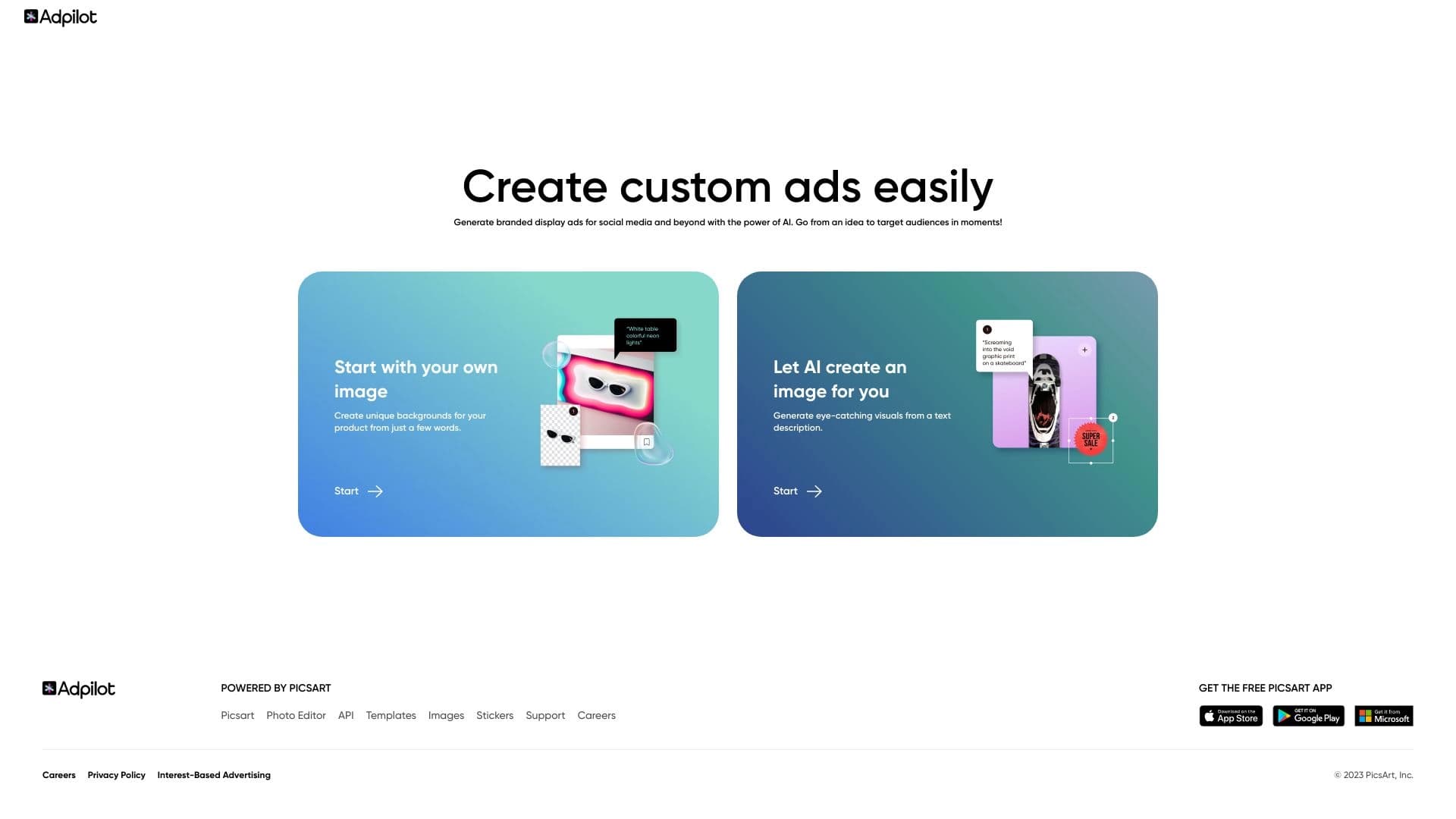
Aperçu général
Admaker par Picsart Description
Admaker by Picsart est un service en ligne alimenté par l'IA conçu pour créer rapidement des bannières publicitaires et créatives. Il est développé par Picsart, une entreprise connue pour ses outils de montage photo populaires. Le but principal du service est d'aider les utilisateurs à obtenir une publicité terminée en quelques minutes seulement : il suffit de télécharger une photo de produit, et le réseau neuronal génère automatiquement un fond approprié et une copie publicitaire.
La plateforme s'adresse aux propriétaires de petites entreprises et aux commerçants qui ont besoin de créer régulièrement des publicités attrayantes pour les médias sociaux sans embaucher de concepteurs ou utiliser des logiciels professionnels complexes. Après génération automatique, les utilisateurs peuvent ajuster manuellement le résultat : changer les couleurs, les polices et le placement des éléments pour adapter la mise en page à l'identité visuelle de leur marque.
Admaker by Picsart Caractéristiques
| Fonctionnalité | Valeur |
|---|---|
| Type | Service en ligne pour générer des créations publicitaires |
| Catégories | Créations publicitaires, génération d'annonces, générateurs de description de produits, outils d'image de fond, services de marketing numérique, assistants de médias sociaux, générateurs d'annonces |
| Plateforme | Site Web |
| Développeur | La société Picsart, Inc. |
| Modèle de distribution | Fromage |
| Plan gratuit | Oui, caractéristiques de base et création de premières annonces |
| Plan de démarrage | Les prix varient selon les régions |
| Plan professionnel | Les prix varient selon les régions |
| Note de l'éditeur | 8,8 sur 10 |
| Note de l'utilisateur | 4.7 sur 5 |
| Visites mensuelles | 2,6 millions |
| Site Web | onlineadmaker.com |
Pour qui est Admaker by Picsart ?
Propriétaires de petites entreprises
Admaker by Picsart est une solution pour les entrepreneurs qui ont besoin de publier régulièrement des messages promotionnels sur les médias sociaux mais ne peuvent pas se permettre d'embaucher un designer interne. Le service leur permet de créer rapidement des bannières soignées et axées sur la conversion pour les magasins en ligne ou les entreprises locales sans se laisser distraire par des éditeurs complexes.
Spécialistes du SMM et experts du ciblage
Les professionnels du marketing peuvent utiliser l'outil pour préparer rapidement les créatifs pour les campagnes publicitaires. La possibilité de générer rapidement de multiples variations publicitaires et de tester différentes hypothèses sans montage manuel long est particulièrement utile pour exécuter des tests A/B et adapter des publicités pour différents publics.
Débutant marketing sans expérience de conception
L'interface de service est conçue pour être intuitive pour les utilisateurs sans compétences spécialisées. Il n'est pas nécessaire de comprendre les couches, les masques ou la correction des couleurs — l'IA gère tout le travail technique, tandis que l'utilisateur examine simplement le résultat.
Comment utiliser Admaker par Picsart?
Processus de création de publicité étape par étape
Travailler avec le service commence par télécharger une photo de produit. L'IA suggère ensuite des options de fond qui correspondent à l'image. Vous pouvez également demander au réseau neuronal de créer une nouvelle image à partir de zéro si vous n'avez pas une photo appropriée.
Réglage du texte et des éléments visuels
Après avoir sélectionné un arrière-plan, les utilisateurs peuvent saisir leur propre copie publicitaire ou utiliser le texte généré. L'étape suivante permet d'ajuster les couleurs et les polices pour aligner la mise en page sur l'identité visuelle de la marque. Tous les changements sont affichés en temps réel, ce qui facilite le contrôle du résultat.
Aperçu et exportation
Le service vous permet de voir comment l'annonce va regarder sur un ordinateur et sur un écran de smartphone. Après les modifications finales, la mise en page finie peut être téléchargée dans le format et la taille requis pour un réseau social spécifique.
Principales caractéristiques de Admaker by Picsart
Génération automatique d'arrière-plan et de texte
L'outil sélectionne et crée automatiquement des images, des arrière-plans et des copies publicitaires en fonction de la photo téléchargée. Cela sauve les utilisateurs de l'écriture de textes persuasifs ou de la recherche d'images appropriées sur les sites de stock.
Mise en page
Après la génération automatique, les utilisateurs peuvent apporter des modifications : ajuster la palette de couleurs, choisir les polices et affiner l'arrière-plan et le texte. Cela permet d'adapter une présentation universelle aux besoins spécifiques de la marque.
Aperçu sur différents appareils
L'outil montre comment la bannière va regarder sur les écrans de différents appareils. Cela permet d'éviter les problèmes de recadrage du texte ou les éléments clés mal placés avant de lancer une campagne.
Admaker par Picsart avantages
- Economisez du temps et de l'argent: une bannière finie est créée en environ cinq minutes sans avoir besoin d'engager un concepteur ou d'acheter des logiciels coûteux.
- Facile à utiliser: l'interface n'est pas surchargée d'outils professionnels, et les utilisateurs sans expérience de conception peuvent le comprendre.
- Gratuit pour le démarrage: le service offre un forfait gratuit avec des fonctionnalités de base, permettant aux utilisateurs de tester l'outil avant d'acheter un abonnement.
- Soutenu par Picsart: le développeur est un joueur bien connu sur le marché des outils d'édition d'images, qui parle de la fiabilité du service.
- Personnalisation de la marque: les utilisateurs peuvent ajuster les couleurs, les polices et les fonds en fonction de l'identité visuelle de leur entreprise.
- Evaluations élevées des utilisateurs: le service a reçu 4,7 sur 5.
Admaker par Picsart désavantages
- Résultats fondés sur des modèles: avec une utilisation fréquente, les annonces peuvent commencer à ressembler — les options visuelles se répètent parfois.
- Perte d'individualité: les générations automatiques ne peuvent pas toujours transmettre les caractéristiques uniques d'un produit spécifique.
- Flexibilité limitée: l'outil n'est pas adapté à la mise en œuvre d'idées de conception complexes ou non conventionnelles, ni au placement d'éléments non standard dans la disposition.
Quelles tâches Admaker by Picsart résout-il ?
- Génération rapide de publicités créatives pour les médias sociaux: l'outil vous permet d'obtenir des messages et bannières finis pour Instagram et d'autres plateformes en quelques minutes.
- Création de bannières pour les magasins en ligne: les utilisateurs peuvent rapidement préparer des dessins visuels pour les listes de produits sans attendre la réponse d'un concepteur.
- Test d'hypothèses publicitaires: le service permet de créer instantanément de multiples variations publicitaires et de les lancer pour comparer les performances, puis se concentrer sur les meilleures.
- Soutenir les campagnes publicitaires: l'outil vous permet d'adapter les matériaux existants à différents formats et publics sans reconstruire manuellement des créations.
Admaker par Picsart prix
Le service fonctionne sur un modèle freemium. Les utilisateurs ont accès à un plan gratuit qui comprend des fonctionnalités de base : générer vos premières annonces, exporter des images, et de l'édition de la mise en page simple.
Pour ceux qui ont besoin de capacités supplémentaires, des régimes rémunérés sont disponibles :
- Plan de démarrage: la tarification varie selon les régions — comprend des modèles supplémentaires, une fonctionnalité d'édition étendue et un soutien prioritaire.
- Plan professionnel: la tarification varie selon les régions — débloque toutes les fonctionnalités de service, y compris des solutions personnalisées et un support technique rapide.
Les termes exacts et les détails du plan doivent être vérifiés sur le site de service officiel, car ils peuvent être modifiés par le développeur.
Conditions d'utilisation pour Admaker by Picsart
Le service est disponible en ligne via un navigateur Web. L'enregistrement n'est pas mentionné comme une exigence obligatoire, mais la création d'un compte sera probablement nécessaire pour économiser des projets et utiliser des régimes payés. Vous pouvez commencer par le forfait gratuit, qui ne nécessite aucun paiement mais a des limites sur l'accès aux fonctionnalités avancées. La documentation officielle ne précise pas l'âge requis ou si une personne morale est nécessaire pour un abonnement.
Admaker par Picsart disponibilité
L'outil est disponible en tant qu'application web sur onlineadmaker.com et est accessible dans la plupart des pays du monde. Les langues d'interface et la liste des régions prises en charge ne sont pas officiellement limitées.
Comment Admaker par Picsart diffère des alternatives
La principale différence entre Admaker by Picsart et ses concurrents les plus proches, tels que Leonardo.ai, Midjourney ou Yandex Art, est son accent exclusif sur les bannières publicitaires. Bien que ces outils offrent de vastes capacités pour la génération d'images à usage général et nécessitent plus de temps pour traiter les appels, Admaker vise directement à créer une mise en page publicitaire finie avec du texte et du fond. Les utilisateurs viennent de télécharger une photo — et le service crée automatiquement une annonce attrayante. Une autre différence est son intégration profonde à l'écosystème Picsart, qui permet d'accéder à une grande bibliothèque de modèles et d'éléments graphiques.
Conclusion
Admaker by Picsart est un outil pratique pour les petites entreprises et les commerçants qui ont besoin de créer rapidement du matériel publicitaire pour les médias sociaux sans compétences de conception. Le service répond au besoin principal de son public cible — rapidité et simplicité pour obtenir des résultats de qualité. Grâce au forfait gratuit, les utilisateurs peuvent évaluer les capacités du réseau neuronal avant d'acheter un abonnement payant. Les principales limitations de l'outil sont liées aux résultats fondés sur des modèles et à une flexibilité insuffisante pour les idées créatives non conventionnelles, de sorte qu'il peut être d'une utilisation limitée pour les grandes marques avec des exigences de conception uniques.
Foire aux questions
Voir aussi

Plateforme d'IA multifonctionnelle pour la création de contenu, combinant synthèse vocale, génération de texte, création d'avatar et montage vidéo.


Assistant marketing AI qui aide à créer des stratégies de promotion et optimiser les campagnes publicitaires.


Éditeur vidéo avec support réseau neuronal pour l'édition vidéo sur Windows et Mac.

Plate-forme Cloud pour la création de vidéos utilisant des avatars AI, la synthèse de la parole et la traduction automatique de clips dans des dizaines de langues.


Service basé sur l'IA pour la génération automatique de contenu texte dans différents formats.

Service en ligne alimenté par l'IA pour générer automatiquement des sous-titres vidéo.


Réseau neuronal qui génère des images et des illustrations basées sur une description texte.


Plateforme alimentée par l'IA pour générer, éditer des images et créer des créations publicitaires.