

Actimate
Assistente de IA para automatizar o planejamento de tarefas e a gestão do tempo.
Visão geral
Ativar a descrição do assistente de IA
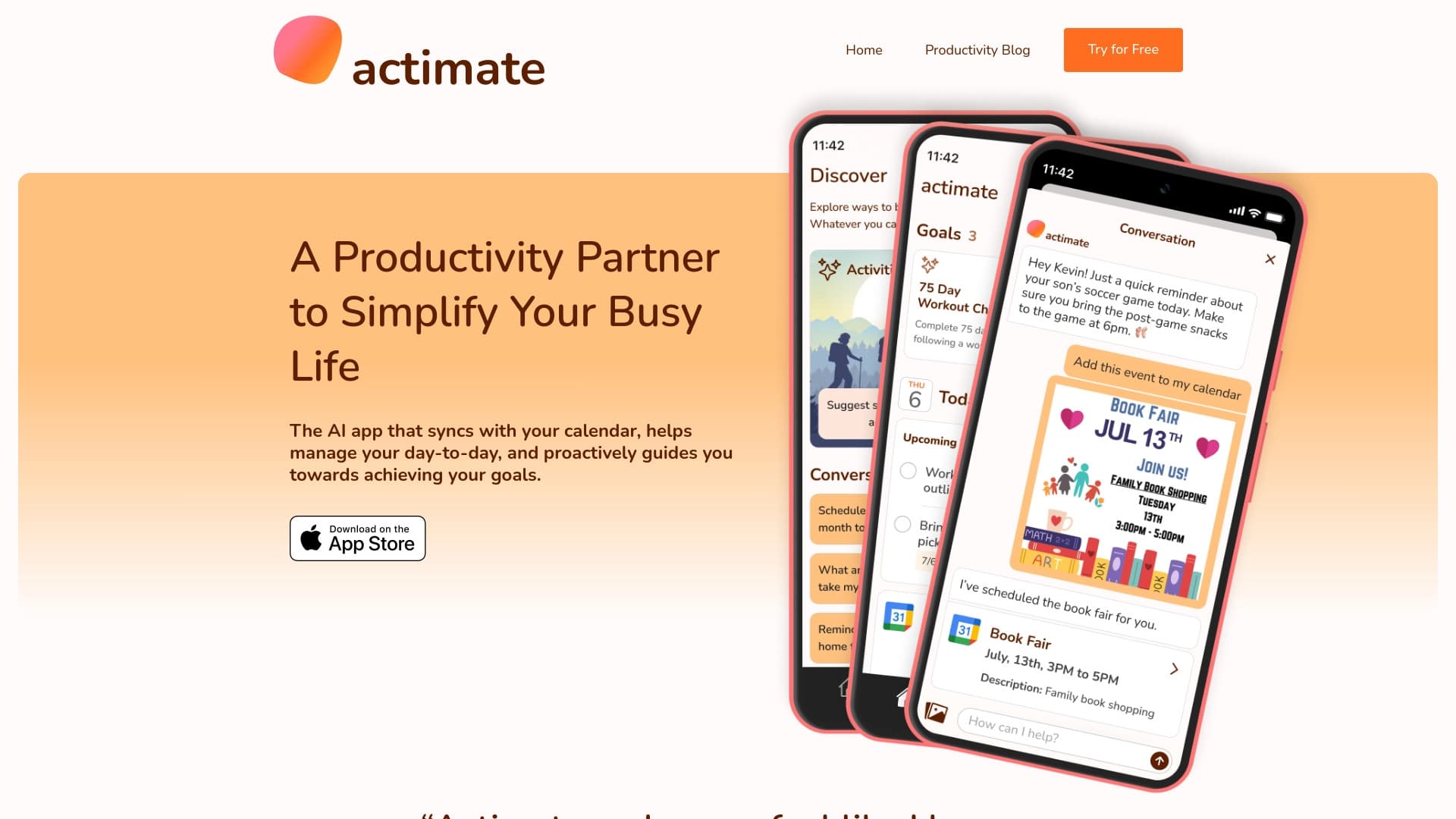
Actimate é um assistente inteligente que assume a rotina de planejamento e gerenciamento de tempo. Em vez de entrar manualmente em todas as reuniões ou rastrear prazos, os usuários delegam essas tarefas no algoritmo. O sistema analisa a carga de trabalho diária, prioriza automaticamente itens de calendário e lembra gentilmente sobre eventos importantes.
A principal característica do serviço é sua abordagem proativa. O Actimate não grava apenas tarefas – sugere momentos ótimos para completá-las, quebra grandes projetos em pequenos passos acionáveis e realiza check-ins interativos diários. Isso ajuda a reduzir a ansiedade e a fadiga de manter constantemente tudo em mente, permitindo que os usuários se concentrem na substância em vez de organizar processos.
Funcionalidades Ativas
| Característica | Valor |
|---|---|
| Tipo | Assistente de IA proativo |
| Categorias | Assistentes de escrita, ferramentas de parenting, ferramentas de gerenciamento de tarefas, ferramentas de automação de agenda, ferramentas de produtividade, ferramentas de coaching |
| Desenvolvimento | ActimatoAI LLC |
| Visitas Mensais | 388,9K |
| Plataforma | Sítio Web |
| Plano Livre | Sim (Basic) |
| Custo de Assinatura | Do plano gratuito ao nível do prémio |
| Termos de Utilização | Requer acesso ao calendário, tarefas e objetivos |
Para quem é a IA ativada?
O Actimate é projetado para duas categorias principais de usuários cujas vidas envolvem altas cargas de trabalho e constante mudança de tarefas.
Profissionais Ocupados
São pessoas que equilibram prazos, reuniões e tarefas estratégicas. Eles não têm tempo para sincronizar manualmente compromissos e planejar cada passo. Actimate ajuda tais especialistas a estruturar automaticamente seu dia de trabalho, libertando recursos cognitivos para tarefas verdadeiramente importantes.
Pais e famílias
Os pais têm que fazer malabarismos nas responsabilidades de trabalho com horários das crianças, atividades extracurriculares e tarefas domésticas. Acompanhar tudo é quase impossível. Actima age como um assistente digital que gerencia o calendário familiar e garante que nenhum detalhe seja ignorado, reduzindo o caos diário.
Como usar Ativar IA
O serviço funciona em um princípio de "conectar e delegar". Abaixo estão os passos principais para começar.
1. Conexão e Configuração
O primeiro passo é conceder ao assistente acesso ao seu calendário primário. Ativar sincroniza com dados de eventos e reuniões para obter uma imagem completa da sua carga de trabalho. Permissão para processar dados de tarefas e objetivos também é necessária.
2. Definir Objetivos
Após a sincronização, você precisa definir seus objetivos de curto e longo prazo. Estes podem ser projetos de trabalho ou tarefas pessoais. O sistema as analisa e as divide em passos concretos em que você pode começar a trabalhar hoje.
3. Interacção Diária
O serviço então opera em modo proativo. Todos os dias, a IA envia lembretes sobre o que precisa ser feito e marca itens completados. O usuário simplesmente segue os prompts e rastreia o progresso através de check-ins interativos.
Características de Ativar Chave
O kit de ferramentas do serviço foi projetado para tornar o planejamento o mais passivo possível para o usuário.
Calendário Adaptativo
Isto não é apenas uma lista de afazeres, mas uma agenda inteligente. O sistema encontra slots de tempo livres na programação e sugere tarefas para preenchê-los, adaptando-se automaticamente às mudanças. Se uma reunião for remarcada, a IA reorganiza instantaneamente o resto do dia.
Check-ins e objetivos interativos
Em vez de uma lista de tarefas chata, Actima realiza check-ins diários — sessões de conversação curtas que ajudam a alinhar o status atual com o plano. Grandes objetivos são divididos visualmente em etapas, então você sempre vê qual é o próximo passo e quanto foi concluído.
Notificações e sistema de marcação
Os usuários recebem lembretes oportunos sobre reuniões e prazos. Os marcadores de conclusão são interativos – não apenas uma caixa de seleção, mas uma interação com a IA que registra o progresso e ajusta planos futuros com base na velocidade de execução e produtividade.
Vantagens de Ativação
Usar o assistente de IA oferece vários benefícios tangíveis em comparação com os planejadores clássicos.
- Economia de tempo na organização. Distribuição automática de tarefas elimina a necessidade de "lotar" manualmente tarefas em horas e dias. O planejamento requer esforço mínimo.
- Apoio e motivação. Check-ins diários e lembretes ajudam você a manter o foco nos objetivos. O sistema funciona como um parceiro de responsabilidade pessoal.
- Transparência dos progressos. Com objetivos quebrados em etapas, é sempre claro onde você está e o que fazer a seguir. Isto reduz a confusão e os sentimentos de opressão.
Desvantagens Ativadas
Apesar da conveniência da automação, o serviço tem várias limitações que merecem ser consideradas.
- Risco de dependência. Há uma chance de os usuários descarregarem totalmente o planejamento para a IA e perderem habilidades de priorização manual. Se pararem de usar o serviço, a organização de seu dia pode tornar - se mais difícil.
- Inflexibilidade com horários não padrão. A ferramenta pode nem sempre adaptar-se corretamente às circunstâncias individuais, como turnos noturnos ou hobbies não convencionais que requerem uma rotina diária especial.
- Preocupações de privacidade. Actima requer acesso a dados pessoais: calendário, lista de tarefas , e objetivos. Isso exige confiança no serviço e uma compreensão de sua política de processamento de dados.
Que problemas resolve a ação?
O assistente visa abordar exaustivamente os desafios da gestão do tempo.
- Gestão do tempo. A ferramenta ajuda racionalmente a alocar horas durante todo o dia, separando automaticamente importante de urgente.
- Gestão inteligente de calendários. A IA programa automaticamente e remarca os eventos, economizando tempo na coordenação manual.
- Rastreamento de alvos. Permite monitorar o progresso em direção a grandes objetivos, quebrando-os em marcos mensuráveis.
- Reunião e controle de tarefas. O sistema garante que você nunca esqueça compromissos e lembra-lhe sobre chamadas programadas ou reuniões a tempo.
- Acompanhamento dos progressos. Actima rastreia projetos de trabalho e objetivos pessoais com eficiência igual, fornecendo uma imagem completa dos resultados alcançados.
Ativar preços
O serviço opera em um modelo de assinatura com três planos diferenciados por conjunto de recursos.
- Básico (Livre). Inclui acesso aos recursos principais de gerenciamento de tarefas. Adequado para uma introdução inicial às capacidades do serviço.
- Padrão. Um conjunto de recursos expandidos: agendamento inteligente e notificações avançadas estão incluídos. Ideal para usuários ativos.
- Premium. Desbloqueia o acesso total a todos os recursos, incluindo suporte prioritário ao cliente e recomendações personalizadas de IA. Projetado para profissionais com altas cargas de trabalho.
Ativar os Termos de Uso
Para ativar o serviço, os usuários devem atender a vários requisitos. Em primeiro lugar, isto implica a ligação de um calendário e a concessão do acesso ao serviço aos dados pessoais. Isso inclui informações sobre tarefas e objetivos. Sem dados para analisar, a Actimate não pode construir adequadamente agendas e gerar lembretes, então o acesso a dados pessoais é uma condição obrigatória para que o assistente funcione plenamente.
Disponibilidade Ativada
Atualmente, o serviço está disponível exclusivamente em formato web. Actimate é usado através de um navegador em qualquer dispositivo (computador, laptop, tablet ou smartphone). Ele opera como um assistente online, e nenhum aplicativo dedicado para desktop ou plataformas móveis estão listados na descrição. Todo o trabalho e sincronização acontecem através do site.
Como Ativar Difere de Alternativas
A principal diferença entre Actimate e planejadores tradicionais ou a maioria das alternativas reside em sua natureza proativa. Muitos aplicativos apenas gravam tarefas, deixando o planejamento para o usuário. Actima trabalha à frente da curva: sugere sequências de ação, inicia remarcação e ajusta o cronograma por conta própria.
Dois aspectos adicionais se destacam: check-ins interativos diários que transformam a gestão de tarefas em um diálogo ativo com a IA , e um calendário genuinamente inteligente que não apenas exibe reuniões, mas gerencia blocos de tempo, ajudando os usuários a evitar serem sobrecarregados por sua carga de trabalho.
Conclusão
Actimato é uma ferramenta prática para aqueles cansados de planejamento manual que querem reduzir a carga cognitiva. Automatizando tarefas rotineiras – desde organizar tarefas no calendário até check-ins e lembretes diários – o serviço permite que os usuários se concentrem na substância de seu trabalho e não em sua organização. É uma solução confiável para profissionais e pais que valorizam seu tempo. No entanto, antes de usá-lo, é importante ponderar considerações de privacidade e reconhecer que a automação completa requer confiança em algoritmos e pode exigir adaptação a ritmos de vida não padrão.
Perguntas mais frequentes
Consulte também


Plataforma para desenvolvimento, monitoramento e avaliação de aplicações de IA baseadas em grandes modelos de linguagem.

Plataforma para criar e personalizar companheiros virtuais com aparência e personalidade individuais.

Agente de IA para automatizar comunicações e suporte ao cliente.

Plataforma de agregação de notícias mundiais que usa IA para análise e redução de viés.


Mais de 200 prompts prontos para negócios e SEO, adaptáveis ao ChatGPT, Claude e Gemini.

Plataforma para criar chats de IA personalizados, treinados com seus próprios dados de negócios.

Plataforma IA para síntese de voz e clonagem que converte texto em discurso realista.


Plataforma IA para criação rápida de sites e gerenciamento de processos de pequenas empresas.