Actavivo
Free iOS app for organizing communication and schedules in groups and teams.

Overview
Actavivo AI Description
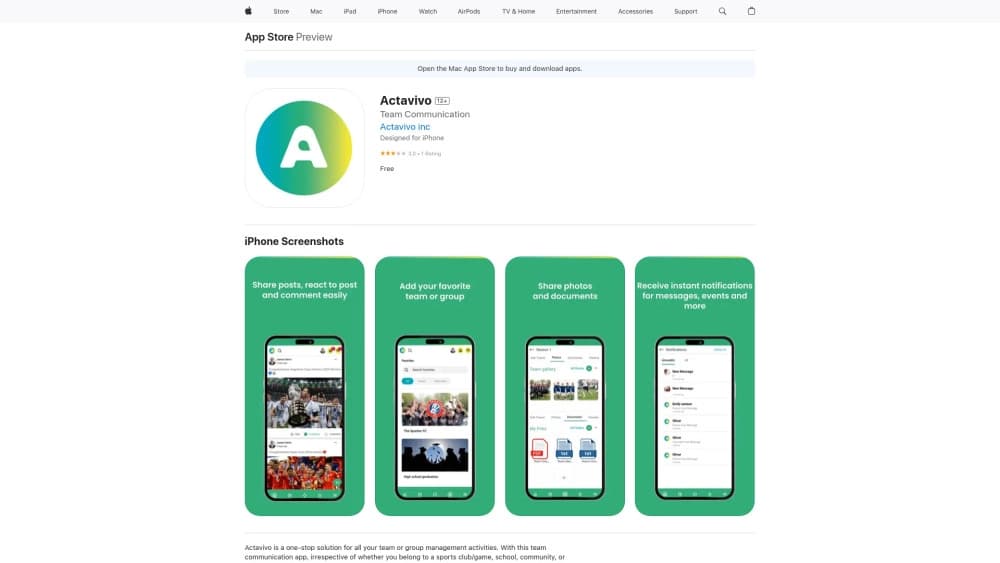
Actavivo is a mobile app for Apple devices that combines group chat and schedule organizer functions. The service is designed to eliminate the need for teams to use several different tools for communication, meeting planning, and attendance tracking.
Instead of messaging in one app and managing schedules in another, Actavivo offers a unified space. Here, group members can discuss news in chat, share files and photos, and view upcoming events in a shared calendar. The key feature is the ability to mark attendance at events with a single "going/not going" button, which simplifies headcount tracking for organizers.
The app is available for free with basic functionality. For users who require advanced features, paid subscriptions are available. The developer positions the product as a simple solution that requires no lengthy training and suits groups of any age — from school classes to sports clubs.
Actavivo Specifications
| Specification | Value |
|---|---|
| Type | Team communication app |
| Categories | Team collaboration tools, Social media assistants |
| Platform | iOS (iPhone, iPad, iPod touch) |
| Free tier | Yes (free) |
| Developer | Actavivo |
| Monthly visits | 388.9K |
| Distribution model | Freemium |
Who is Actavivo AI for?
Sports teams and clubs
Actavivo is especially useful for sports groups. Coaches and captains can create groups for the team, publish training and match schedules, and track which players have confirmed their attendance. This eliminates the need to call each participant or rely on a general chat where important messages get lost among discussions.
Schools and study groups
The app is suitable for organizing the learning process. Class teachers can create groups for the class, send out information about parent meetings, homework, and extracurricular activities. Parents and students can quickly contact the teacher, and all important announcements are stored in one place. Actavivo is also convenient for managing school clubs and sections.
Hobby communities and volunteer groups
The service is also useful for any interest-based groups — book clubs, volunteer organizations, hiking groups, or groups of friends who regularly organize shared activities. The built-in calendar and attendance marking feature help easily plan meetings, trips, or joint projects without unnecessary bureaucracy.
How to use Actavivo AI?
Installation and registration
To start using the app, you need to download it from the App Store — the service is only available for iOS devices. After installation, you will need to complete a registration process that takes a couple of minutes. A standard set of credentials is used to log in, and once the account is created, you can start working right away.
Creating a group and initial setup
After registration, the user can create a new group for their team. The app allows splitting participants into separate groups if needed — for example, a general chat for the whole team, a separate group for management, or one for a project subgroup. The interface is designed so new members can quickly understand the functionality without additional instructions.
Daily work and event management
In daily use, Actavivo comes down to two main actions: chatting and working with the schedule. In the chat, you can send text messages, photos, and videos. In the schedule section, events are created, and participants respond with "going" or "not going" marks. The system sends personal reminders about upcoming events so no one forgets a meeting or training session.
Key Features of Actavivo
Communication and content sharing
The built-in chat supports sending text messages, photos, and videos. All discussions and materials are stored in one place, making it easy to find the information you need. Participants can share group news, discuss event details, and quickly resolve organizational issues.
Schedule and event management
The app includes a built-in calendar where events and meetings can be created. Group members see upcoming events and can mark their attendance — "going" or "not going." The organizer gets a clear picture of expected attendance, simplifying planning.
Attendance confirmation and reminders
Actavivo's key tool is tracking attendance at events. After an event is created, the app collects reactions and comments from participants, forming a list of confirmed attendees. The system also sends personal reminders, reducing the risk of missing important events and helping participants plan their time.
Actavivo Advantages
Free basic functionality
Actavivo truly doesn't require payment for core features. After installation, the app provides access to chat, calendar, and event management without needing a subscription. This makes the service accessible to budget-constrained organizations — school clubs, amateur teams, and small groups.
Simple and intuitive interface
The app is designed with different age groups in mind. The interface is minimalist and not overloaded with secondary elements. Navigation is intuitive, which is especially important for teams with older members or people who aren't confident with technology.
Centralized communication and planning
Actavivo solves the problem of scattered information. Instead of switching between a messenger, calendar, and bulletin board, the whole team works in a single space. This reduces the risk of losing important messages and simplifies meeting coordination, as all necessary information is in one app.
Actavivo Disadvantages
Limited to the iOS platform
The service works exclusively on Apple devices — iPhone, iPad, and iPod touch. This automatically excludes Android users. If a team has members with smartphones on other operating systems, they won't be able to participate in communication through Actavivo, making the tool unsuitable for mixed groups.
Few integrations with other services
At the current stage of development, the app barely interacts with other popular platforms. The lack of integrations with Google calendars, messengers, or cloud storage can be a limiting factor for teams used to working with a combination of several products. For full document management or synchronization with external services, third-party apps will be needed.
Privacy and adaptation concerns
The group communication format means all messages and materials are accessible to all group members, which can pose data security risks. Additionally, people accustomed to other tools — such as Telegram, WhatsApp, or specialized platforms like Teamer — may face difficulties switching to the new service and will need time to adapt.
What Problems Does Actavivo Solve?
Organizing group communication
The app concentrates all discussions, announcements, and attachments in one place. Members no longer need to search for information in message threads or forward messages to each other — everything related to group life is in a single chat.
Planning and coordinating events
Actavivo simplifies the process of organizing meetings and events. When creating an event in the calendar, the organizer immediately sees who has confirmed attendance and who hasn't. This speeds up decision-making and prevents situations where an event falls through because invitees "forgot" to respond.
Managing the group schedule
Thanks to the built-in calendar and reminders, the team always stays informed about upcoming events. Personal notifications help members not forget important dates, which is especially relevant for groups with a high frequency of events — sports sections, club activities, or regular group meetings.
Actavivo Pricing
The app uses a freemium model, meaning basic free access with the option to upgrade to paid tiers for expanded functionality. The free version includes access to core features: group chats, event creation, and attendance tracking.
For those who need additional tools and advanced settings, the "Team" plan is available. It unlocks additional administrative functions and more flexible group customization options.
Maximum capabilities are provided by the "Premium" plan. It includes advanced management tools, priority user support, and access to integrations with other services. The choice of plan depends on the group's size and the organizer's needs.
Actavivo Terms of Use
To start using the app, installation from the App Store is required, followed by mandatory account registration. The service does not require downloading from the official website or using third-party installers — distribution is carried out exclusively through the official Apple app store.
The app is only available on devices running iOS. The user will need to create an account to save data about groups, schedules, and conversations, as well as to sync them across their Apple devices.
Actavivo Availability
Actavivo is available exclusively to users in the Apple ecosystem. The app is installed on iPhone, iPad, and iPod touch via the App Store. The main requirement is having an Apple device and an app store account.
For owners of Android, Windows, or other operating system devices, using Actavivo is impossible, which significantly limits the service's audience. All app features are tailored exclusively for iOS and optimized for these devices.
How Actavivo Differs from Alternatives
Narrow focus on team planning
Unlike universal AI-based tools such as ChatGPT, Polymer, or Julius AI, which solve a wide range of tasks — from text generation to data analysis — Actavivo focuses on a specific niche: organizing group life. There are no features unrelated to communication or planning, making the app simpler and more predictable.
Focus on Apple mobile devices
Most well-known AI tools, including Jasper AI, Albert AI, and Powerdrill AI, are web platforms or desktop apps available on various operating systems. Actavivo, in contrast, was originally created as a mobile app for iOS with no web version. This is both a strength (optimization for a specific platform) and a limitation (inability to use on other devices).
Focus on real groups of people
While many AI alternatives target individual users or business processes, Actavivo solves the problem of coordinating real groups of people — teams, clubs, classes. The key difference is the built-in attendance confirmation system and attendance management, which most general-purpose AI tools from the alternatives list don't have.
Conclusion
Actavivo is a free iOS app for team communication, aimed at sports teams, clubs, schools, and any groups of people who need to organize joint activities. The service successfully solves two main tasks: providing centralized member communication and simplifying event planning with attendance control. The app features a simple and intuitive interface suitable for users of different ages, and its basic functionality is available for free. The main limitations are the tie to the Apple ecosystem and the small number of integrations with external services. For teams where all members use iPhones, Actavivo can become a convenient tool for daily coordination.
Frequently asked questions
See also

Yandex's multimodal voice assistant powered by the YandexGPT neural network that answers questions, generates texts and images, analyzes files, and controls the smart home.

Service for creating music track covers based on audio analysis.

Aggregator platform that brings together various AI tools and language models with pay-as-you-go pricing.

AI-powered platform for generating and editing images and videos.

A tool for creating diagrams and mind maps from text descriptions in natural language.
Platform for automatic work time tracking and team productivity analysis.

A multifunctional AI assistant for chat, text and image generation, translation, and programming help.

Platform for automating client acquisition and personalized email campaigns with data enrichment from over 150 sources.