
Academy X
منصة لتعلم اللغات الأجنبية بمساعدة شبكة عصبية تترجم مدخلات النص في الوقت الحقيقي وتساعدك على حفظ الكلمات.
لمحة عامة
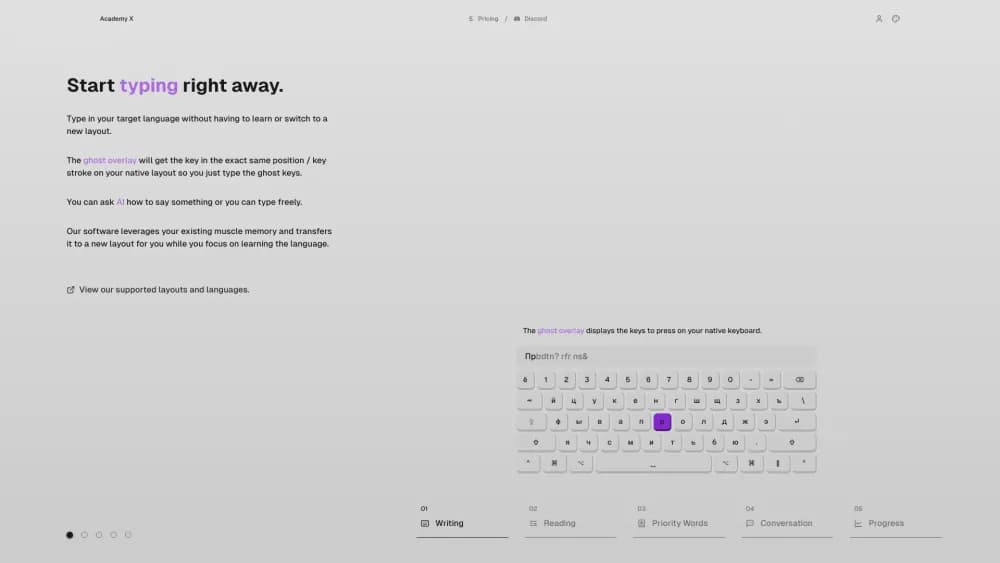
والأكاديمية العاشرة هي منبر لتعلم اللغات الأجنبية المبني حول فكرة إزالة الحواجز التقنية. والسمة الرئيسية لهذه الخدمة هي القدرة على الطباعة باللغة التي تتعلمها دون تغيير مخططات لوحة المفاتيح. ويعترف النظام تلقائياً بما ترغب في إدخاله وترجمة النص في الوقت الحقيقي، ويظهر تلميحات شبه شفافة بمواقع الرسائل.
كيف يعمل
بدلاً من تذكّر لوحة مفاتيح جديدة، أنت تواصل استخدام لوحة مفاتيحك المألوفة، والشبكة العصبية للأكاديمية X تعالج كلّ عمل تحويل مدخلاتك. هذا النهج يجعلك تغطس مباشرة إلى الممارسة دون قضاء الوقت على التجهيز التقني.
ما بداخله
وبالإضافة إلى سمة الترجمة التحريرية للنص، يوفر المنبر أداة للقراءة مبنية مع تسليط الضوء على الكلمات الصعبة. ويتم تتبع الإحصاءات التفصيلية لكل كلمة: تواتر الاستخدام، ومستوى الثقة، والتقدم العام في اقتناء الأجهزة. وهذا يحول عملية التعلم إلى نشاط يمكن قياسه وإدارتها.
الأكاديمية العاشرة
| Feature | القيمة |
|---|---|
| النوع | منتدى التعلم اللغوي |
| الفئة | مساعدو التصميم |
| المطور | الأكاديمية العاشرة |
| الزيارات الشهرية | 74.2K |
| منهاج العمل | الموقع الشبكي (المكتب فقط) |
| خطة مجانية متاحة | نعم |
لمن هي الأكاديمية X؟
لمن يريدون أن يبدأوا بدون تحضير
الأكاديمية العاشرة تناسب الناس الذين تعبوا من المراحل التحضيرية الطويلة و يريدون الحصول مباشرة على ممارسة الكتابة. يمكنك البدء خلال دقيقتين فقط زيارة الموقع والبدء بالطباعة لا يوجد شيء للسيطرة، لا برمجيات إضافية للتركيب، لا دليل للقراءة.
لمن يقدرون الإحصاءات والرقابة
ويناشد المنبر أولئك الذين يحبون تتبع تقدمهم بالتفصيل. النظام يجمع الإحصاءات لكل كلمة: كم مرة تستخدمها وكم أنت واثق من أنك تعرفها إنه يعمل كجهاز تعقب للياقة، لكن لجهازك الصوتي. ويساعد هذا النهج على تحديد الثغرات بسرعة وتعديل عملية التعلم.
لمن يجمع بين الكتابة والقراءة
القارئ المبني مع تسليط الضوء على الكلمات الصعبة مفيد لمن يريدون تطوير مهارات القراءة. يمكنك التبديل بين اللغات المختلفة و الأزواج اللغويين، تدريب الاتجاهات المتعددة في مكان واحد.
كيف تستخدم الأكاديمية X؟
بدأت
للبدء، ببساطة فتح النسخة الإلكترونية من الخدمة على حاسوبك أو حاسوبك المحمول. لا حاجة للتركيب - كل شيء يعمل في بروزر يمكنك البدء بالطباعة على الفور في اللغة التي تتعلمها باستخدام لوحة مفاتيحك المألوفة النظام سيترجم تلقائيا مدخلك ويظهر النتيجة
Hints and built-in AI
إذا واجهت صعوبات، يمكنك أن تسأل مساعد مساعد مساعد مساعد مساعد في شركة AI سؤال أو مجرد الاستمرار في الطباعة - النظام سيوفر تلميحات شبه شفافة عن مواقع الرسائل. وهذا يساعد بشكل خاص في المرحلة الأولية عندما لا يزال التصميم الجديد غير مألوف.
الممارسة المنتظمة
الفكرة الرئيسية هي بناء عادة من خلال الممارسة المتسقة. استخدام الخدمة في المراسلات اليومية أو الملاحظات أو نصوص القراءة. كلما عملت أكثر مع المنبر، الكلمات السريعة تنتقل إلى مظهرك النشط، وكلما زادت الثقة في استخدامهم.
السمات الرئيسية للأكاديمية العاشرة
الطباعة باللغة المستهدفة دون تغيير التصميمات
هذا هو جوهر المنبر. تطبع على لوحة مفاتيحك الأصلية والشبكة العصبية تترجم النص في الوقت الحقيقي تلميحات شبه شفافة تساعدك على توجيه نفسك إذا نسيت مكان الرسائل
أداة القراءة مع تسليط الضوء على الكلمات الصعبة
ويبرز القارئ المبني كلمات هامة وصعبة في النص. وهذا يساعدك على التركيز على المفردات غير المسموعة وتذكيرها في السياق، بدلا من العزل عن الاستخدام الحقيقي.
تتبع التقدم على مستوى الكلمات
ويحتفظ النظام بالإحصاءات لكل كلمة: تواتر الاستخدام ومستوى الثقة. هذا يجعلك ترى الكلمات الصلبة بالفعل والتي تحتاج إلى مزيد من الاهتمام.
مساعد لشؤون البناء
المساعد يجيب على الأسئلة ويقدم تلميحات ويقدم النصائح بينما تعمل إنها متاحة في الوصلة البينية لذا لا تحتاج للبحث عن معلومات في مكان آخر
جيم - مزايا الأكاديمية العاشرة
البداية السريعة بدون تحضير مسبق
لا حاجة لقضاء الوقت في تعلم لوحة مفاتيح جديدة أو تشكيل النظام. في غضون دقائق من زيارتك الأولى للموقع يمكنك البدء في التدريب
إحصائيات مفصّلة مثل جهاز تعقب اللياقة
تعقّب الكلمات المفصّلة بتواتر الاستخدام ومستويات الثقة يعطيك صورة شفافة عن تقدمك أنت دائماً تعرف أيّ فتحات في مفكك ما زالت فارغة
قارئ ملائم
وتبرز أداة القراءة المبنية كلمات هامة وصعبة. هذا يساعدك على الفور على ملاحظة مكتوب جديد دون الحاجة إلى إعادة قراءة النص عدة مرات.
عيوب الأكاديمية X
حدود منهاج العمل
وفي الوقت الراهن، تعمل الدائرة فقط على حاسوب أو حاسوب محمول. المنصة لن تعمل على الأجهزة المحمولة المطورون يعدون بإضافة نسخة متحركة لاحقاً لكن الآن هذا الخيار غير متاح
الحاجة إلى استخدام طريقة جديدة للطباعة
وعلى الرغم من أن النظام يقلل الحواجز التقنية، فإن طريقة الطباعة نفسها غير عادية. يتطلب الأمر بعض الوقت لتعتاد على حقيقة أنك تطبع في مخططك الأصلي والنص يخرج بلغة أجنبية
الرقابة اليدوية المحدودة على التعلم
ويعتمد المنبر في معظمه على القرارات التي يقودها المعهد. خيارات تكييف برنامج التعلم يدوياً محدودة - العديد من البارامترات تحددها الخوارزمية، والتي لا تناسب جميع المستخدمين.
ما هي المشاكل التي تحلها الأكاديمية X؟
تعلم اللغات الجديدة
والمنبر مناسب لتعلم اللغات الأجنبية من الصفر أو لمواصلة الممارسة على مستوى جديد. يمكنك التبديل بين عدة أزواج للغات و الجمع بينها في عملية واحدة
ممارسة الكتابة والقراءة
والخدمة تجمع بين ممارسة الكتابة والقراءة في مكان واحد. وتساعد صياغة الكتابة بمساعدة من منظمة العفو الدولية في تدريب الكتابة، بينما يقوم القارئ بتسليط الضوء على الكلمات الصعبة بتحسين فهم النص باللغة المستهدفة.
تتبع التقدم المحرز وتحديد الثغرات
الإحصاءات التفصيلية عن الكلمات ومستويات الثقة تساعدك على تحديد النقاط الضعيفة بسرعة هذا يسمح لك بتعديل برنامجك في الوقت المناسب والتركيز على مجالات المشاكل
تسعير الأكاديمية X
الأساسي (خالي)
الخطة المجانية تتيح الوصول إلى الملامح الأساسية للمنبر إنها مناسبة للمقدمة الأولى والممارسة الأساسية
المعيار
وتشمل هذه الخطة التدريبات الموسعة والتوصيات الشخصية. يستهدف المستعملين الذين يحتاجون إلى مزيد من التدريب و نصيحة تعلم أكثر استهدافاً
Premium
A full package with detailed progress tracking and expert support. وهو يناسب أولئك الذين يريدون السيطرة القصوى على العملية وهم مستعدون للاستثمار في النتائج.
شروط الاستخدام في الأكاديمية العاشرة
ولا تتاح هذه المنصة إلا من خلال النسخة الإلكترونية على حاسوب أو حاسوب محمول. ولا بد من إنشاء جهاز حاسوبي إضافي على شبكة الإنترنت. وتوفر هذه الخدمة خطة أساسية مجانية، في حين أن الاشتراكات المدفوعة تفتح ملامح إضافية - عمليات موسعة، وتوصيات، وإحصاءات مفصلة، ودعم الخبراء. المطورون يلاحظون أن نسخة متحركة مخططة لكنها غير متاحة حالياً
توافر الأكاديمية
الأكاديمية X تعمل فقط في النسخة الإلكترونية وعلى الحاسوب أو الحاسوب المحمول فقط. الرصيف لن يعمل على هاتف أو طاولة هذا لأن الملامح الرئيسية مصممة من أجل لوحة مفاتيح كاملة وعمل مصفوف على شاشة كبيرة. المطورون يقولون أنهم يخططون لإطلاق نسخة متحركة في المستقبل ولم يُعلن عن أي جدول زمني محدد.
كيف تختلف الأكاديمية X عن البدائل
الفرق الرئيسي في الأكاديمية X يكمن في نهجها للطباعة: أنت لا تبديل المخططات - أنت تواصل الطباعة على لوحة مفاتيحك الخاصة، والشبكة العصبية تترجم مدخلاتك في الوقت الحقيقي. وتركز معظم البدائل في المدونــة - ليوناردو.اي، وكاندينسكي، أوتودراو، وميدجورني، وياندكس آرت )شيديفروم(، وسيبل ديفوسيون - على توليد الصور بدلا من التعلم اللغوي. الأكاديمية (إكس) تحتل مكانها الخاص إنها ليست مولدة للصور بل أداة للكتابة والقراءة ومن بين الخدمات اللغوية، يبرز شكله الهجين - الذي يجمع بين مدرِّب لوحة مفاتيح، ومترجم تحريري، ونظام لتتبع الأجهزة الصوتية في واجهة واحدة.
خاتمة
وتقدم الأكاديمية العاشرة نهجا غير تقليدي إزاء التعلم اللغوي - بدلا من أن تُحفظ لوحة مفاتيح جديدة، تستمرين في صياغة لوحة مفاتيحك المألوفة بينما تترجم منظمة العفو الدولية النص على الذبابة. هذا يخفض الحاجز التقني للدخول ويجعلك تبدأ في التمرين على الفور غير أن المنبر لا يتوافر حاليا إلا على الحاسوب المكتبي، وتتوقف فعاليته إلى حد كبير على مدى ملاءمة إدارة العمليات التي تقودها الوكالة. إذا كنتِ مستعدة للتكيّف مع طريقة غير قياسية وقيمة الإحصاءات التفصيلية على مستوى الكلمات يمكن للأكاديمية العاشرة أن تصبح أداة مفيدة في ممارسة اللغة
الأسئلة المتكررة
انظر أيضا

A platform for aggregating world news using AI to analyze and reduce bias.

A multimedia AI toolkit for editing and enhancing photos, videos, and PDF documents.

Multifunctional AI platform for content creation, combining speech synthesis, text generation, avatar creation, and video editing.

وهناك شبكة عصبية لتحليل الوثائق تستخرج المعلومات الرئيسية وتضع ملخصات وتجيب على الأسئلة المتعلقة بمحتويات الملفات المحملة.

منصة سحاب لإنشاء أشرطة فيديو باستخدام الأفاتار، وخطاب مدمج، والترجمة الآلية للمقاطعات إلى عشرات اللغات.


وهي خدمة على شبكة الإنترنت تعترف بالنص على صفحات مانغا ومانهوا، وتترجمه إلى لغات مختلفة، وتدرجه إلى الصورة دون المساس بالأعمال الفنية الأصلية.
Tool for translating text directly in images while maintaining the original design.

AI keyboard for Apple devices that speeds up typing with corrections, translation, and response generation.